Learn how to create your first INNOCHAT chatbot, from onboarding to training data, customization, and deployment.
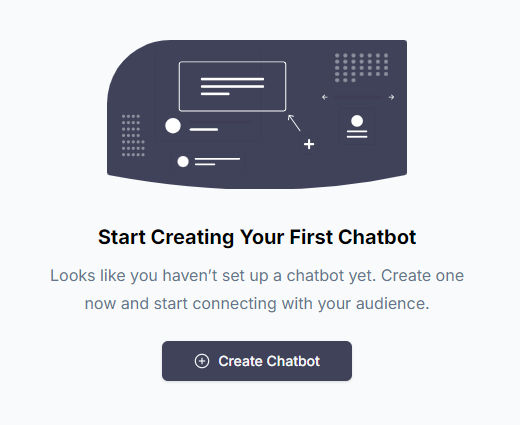
To get started, first log in to your account. If this is your first time using INNOCHAT, you will be asked to complete some
initial onboarding steps. Afterwards, you will be presented with the ability to build an AI chatbot from one of our templates:
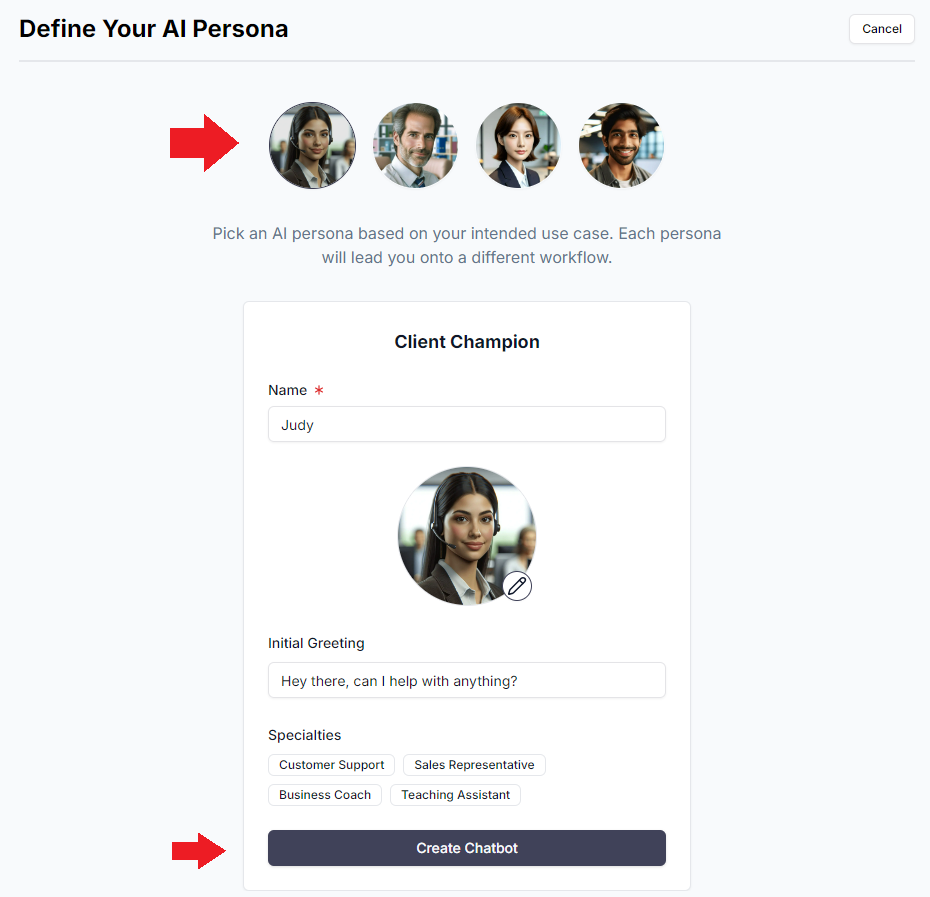
Click on “Create Chatbot”. Then, you will be given a few personas to characterize your AI Agent based on your use case.
These personas have been predefined with a number of use-case-specific customizations, so they work out of the box, for the most part.
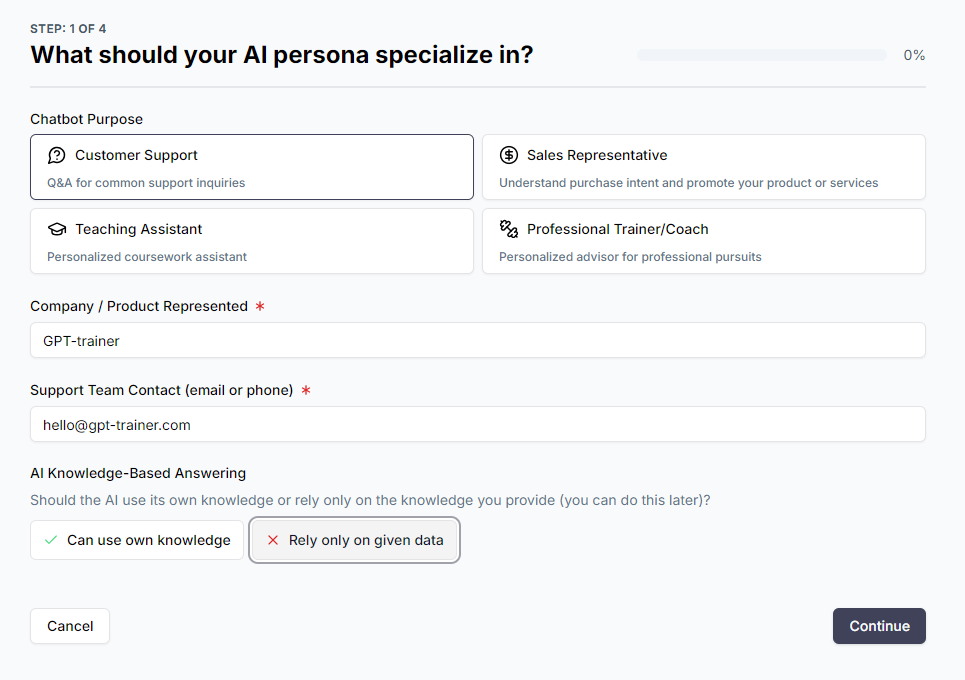
Each persona has a different setup flow, but all of them should be very easy to follow.Let’s take Client Champion for example. After you select the persona, you can pick your AI Agent’s specialty. In our case, we will go
with Customer Support. Next, we tell the system which company the AI Agent represents, as well as the human support team’s contact in case
issues need to be escalated.Depending on how strictly you want the AI Agent to stick to its training data (you will get the chance to provide this later), you can
pick one of the options at the bottom. Let’s pick “Rely only on given data” to be conservative for now.
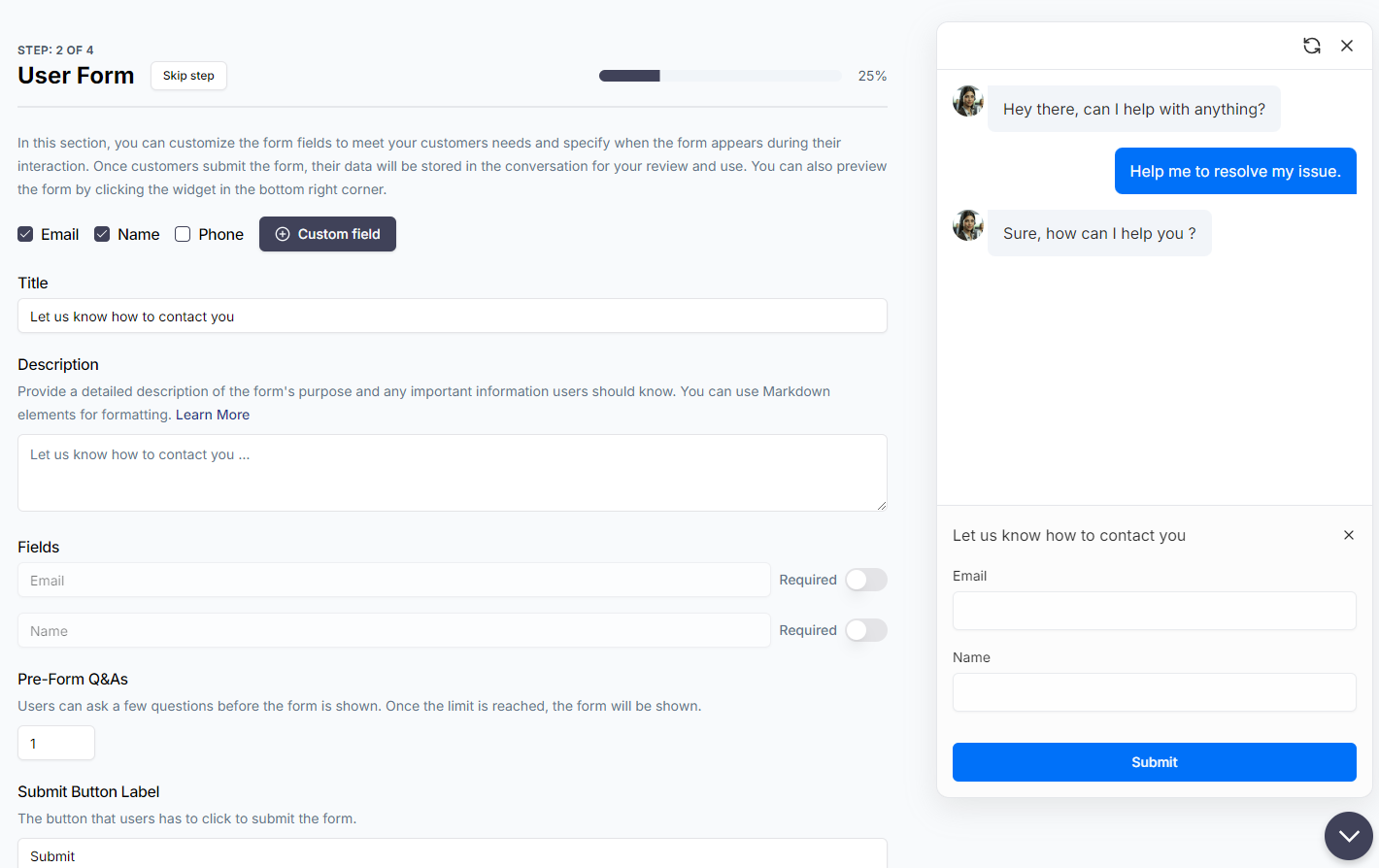
Click “Continue”. Then, since this is a client-facing chatbot, you will be asked to configure a data collection form from the user.
Here, you can define custom form fields, make certain fields mandatory, make the whole form mandatory, make the form show up only after
certain number of Q&As, and much more. When you user submits the form, the data is collected and assocated with the conversation session. You can
then export it as a CSV, or have it sent to you automatically by email or to a CRM via webhook.
If you don’t want a form, simply hit “Skip step” on the top left next to the
title.
Next, let’s edit the appearance of the chat widget. In order to make it thematically consistent with the rest of your website, we have
provided you with a large range of customization options, including font size, color, avatars, and more. We kept things simple for the template
guide, so if you prefer, you can revisit more advanced settings under Customizations tab on the left navigation bar after your chatbot’s initial setup is
complete.
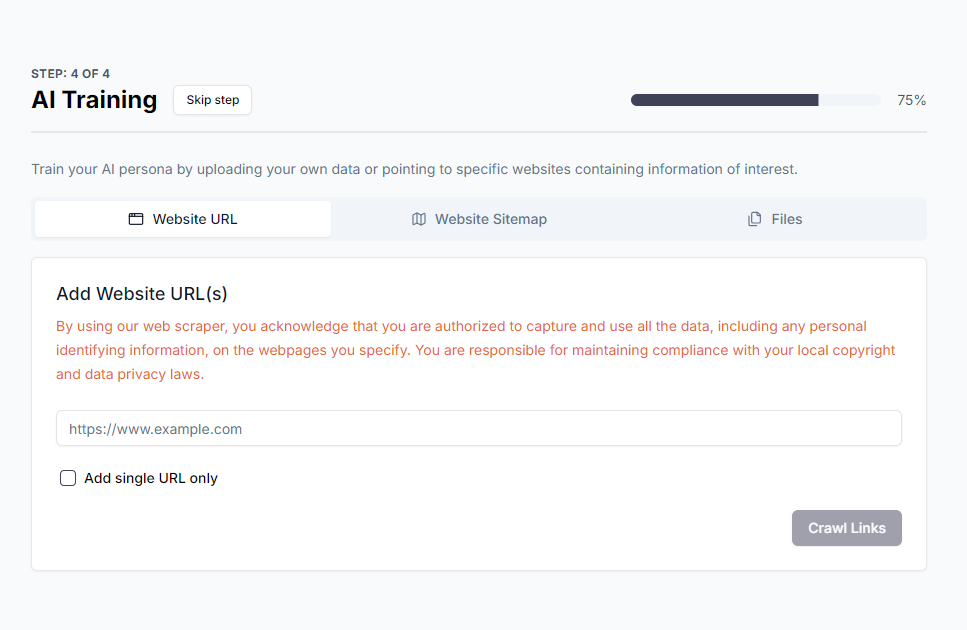
Finally, you are ready to train your AI Agent with your own data!
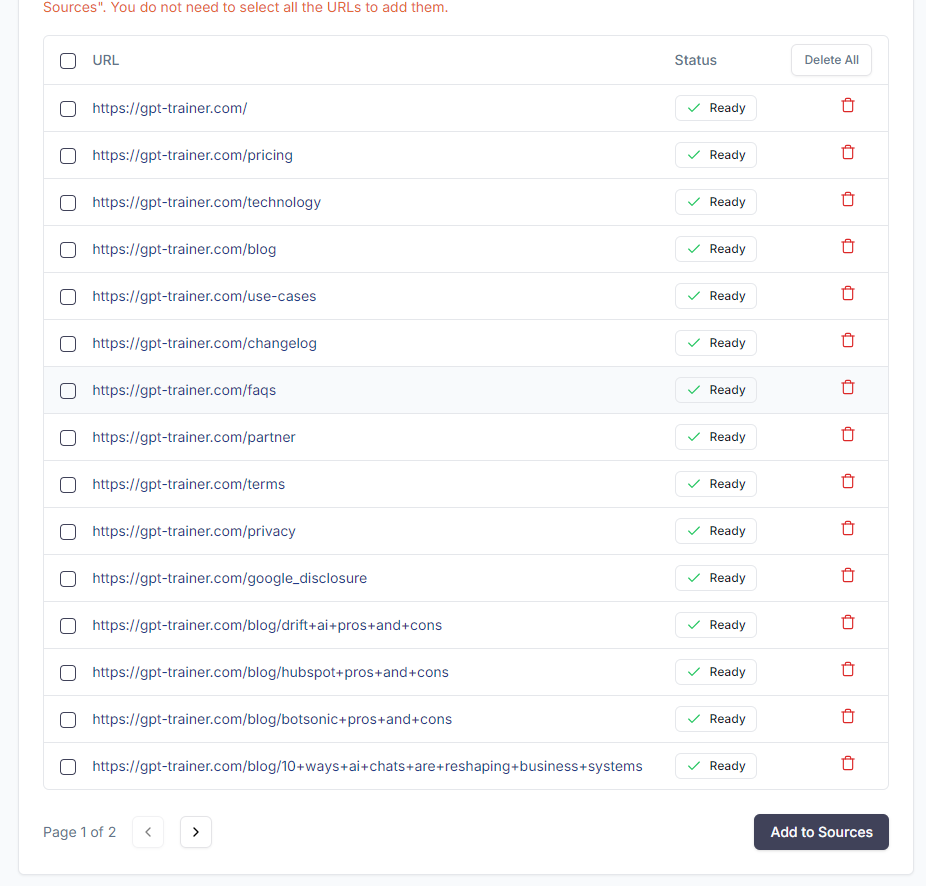
You can upload relevant training data (PDFs, Word, txt) or website sitemaps and URLs. If you have Excel tables, CSVs, images, or YouTube videos, you can
upload them later in the Sources tab on the left navigation bar.
Click “Add to Sources”.Wait for the training to complete. Then, click “Try it out”. innoChat will open a new tab where you can start testing the
preliminary chatbot.In general, the chatbot should be well-configured enough as-is for most common use cases. However, if you would like to fine tune
the chatbot behavior further, update the training data or appearance, or even add additional AI Agents to expand the chatbot’s
capabilities, you can do it by opening the chatbot and tweaking various options on the left navigation bar.Close the chatbot testing tab. You will return to innoChat’s main interface. Go through the onboarding guide to learn more
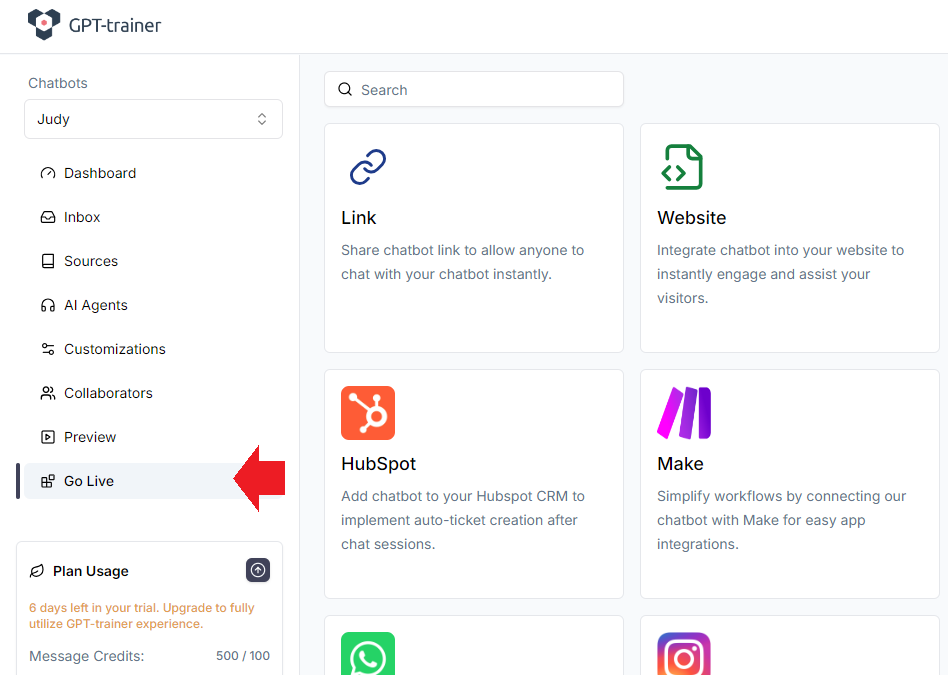
about your options.When you are ready to deploy your chatbot, head to the Go Live tab.
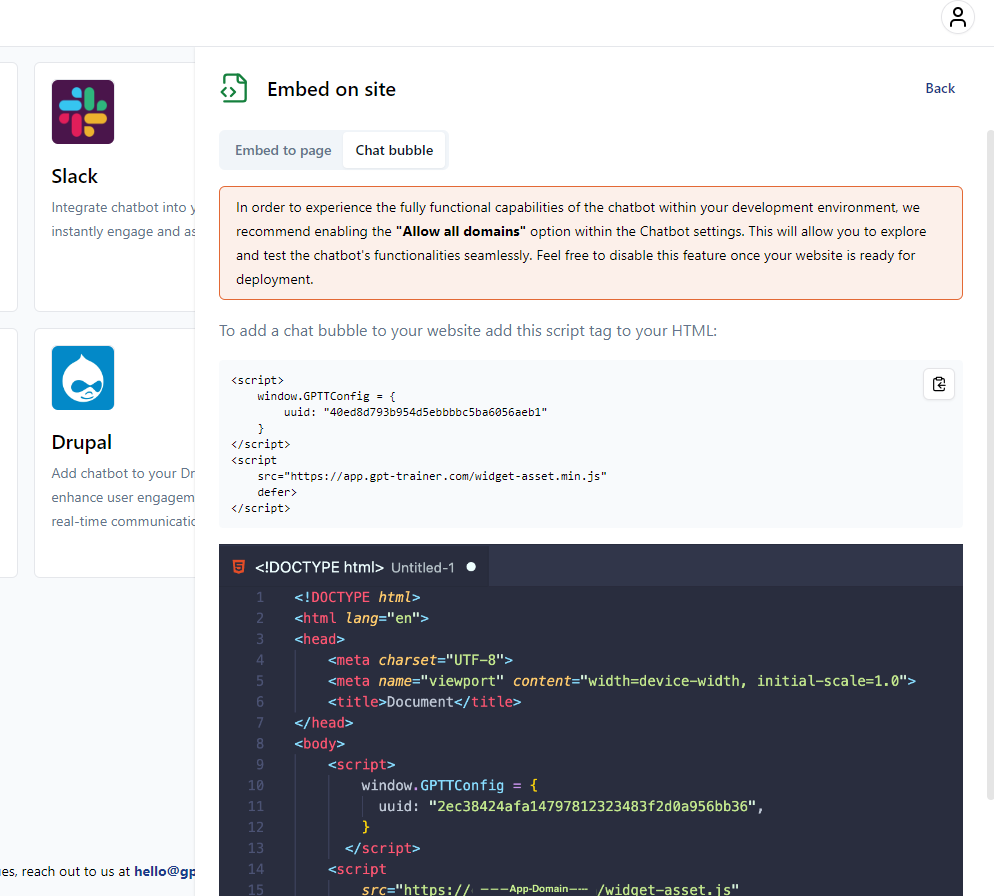
If you want to share the chatbot as a standalone page, simply click Link. You should see a share link automatically generated for you.If you want to embed the chatbot onto a web page, click Website. Detailed instructions will be displayed on the new right sidebar.
To add more chatbots, simply go to the left sidebar and click the dropdown menu. You will be taken to a dedicated page to manage all of your
chatbots.
Please note that depending on your current subscription plan, there is a limit
to the number of chatbots you can create.
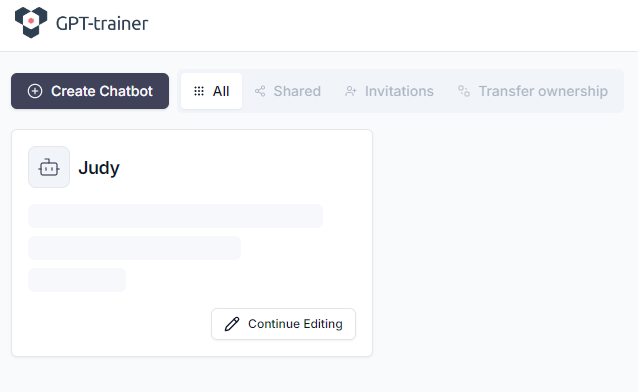
If you need to exit the browser at any point and return to your chatbot creation process later, you will see a screen similar to the
image below. You can easily resume your chatbot creation process by clicking on the Work-In-Progress (WIP) chatbot card.
{"docsConfig":{"theme":"mint","$schema":"https://mintlify.com/docs.json","name":"innoChat API","colors":{"primary":"#2E3F51","light":"#516F90","dark":"#0D001D"},"logo":{"light":"https://mintcdn.com/innoq/m-MXq-_ojngkTbq6/logo/light.svg?fit=max\u0026auto=format\u0026n=m-MXq-_ojngkTbq6\u0026q=85\u0026s=40744d3184133a986aba56b47474b33c","dark":"https://mintcdn.com/innoq/m-MXq-_ojngkTbq6/logo/dark.svg?fit=max\u0026auto=format\u0026n=m-MXq-_ojngkTbq6\u0026q=85\u0026s=b9b2ff5ca3f2aba26ea014cc52e30f81"},"favicon":"/logo/favicon.png","api":{},"background":{},"navbar":{"links":[{"href":"mailto:hello@innochat.ch","label":"Support"}],"primary":{"type":"button","label":"Dashboard","href":"https://app.innochat.ch"}},"navigation":{"languages":[{"language":"en","default":true,"href":"introduction"},{"language":"de","href":"de/introduction"},{"language":"fr","href":"fr/introduction"},{"language":"it","href":"it/introduction"}]}},"deployment":{"deploymentMetadataValue":{"subdomain":"innoq","hasAudioNarration":false,"actualSubdomain":"innoq","customDomains":["docs.innochat.ch"],"gitSource":{"type":"github","owner":"innoq-doc","repo":"innoq-doc","deployBranch":"main","contentDirectory":"","isPrivate":true,"mountPath":"","label":""},"chroma":{"liveDeploymentHistoryId":"6a21e708a8fc07c2afd382a3","collectionId":"53bb3d08-7d40-431e-9052-b46127ae217e","schemaVersion":"v2"},"entitlements":{},"buildId":"6a21e708a8fc07c2afd382a3:success","clientVersion":"0.0.3990","searchFilterCounts":[{"language":"en","tag":"API Reference","count":39},{"language":"de","tag":"API-Referenz","count":39},{"language":"fr","tag":"Référence API","count":39},{"language":"it","tag":"Riferimento API","count":36},{"language":"en","tag":"Data Sources","count":22},{"language":"de","tag":"Datenquellen","count":22},{"language":"fr","tag":"Sources de données","count":22},{"language":"it","tag":"Origini dati","count":22},{"language":"en","tag":"Documentation","count":15},{"language":"de","tag":"Dokumentation","count":15},{"language":"fr","tag":"Documentation","count":15},{"language":"it","tag":"Documentazione","count":15},{"language":"en","tag":"Chatbots","count":12},{"language":"en","tag":"Guides","count":12},{"language":"de","tag":"Chatbots","count":12},{"language":"de","tag":"Anleitungen","count":12},{"language":"fr","tag":"Chatbots","count":12},{"language":"fr","tag":"Guides","count":12},{"language":"it","tag":"Chatbot","count":12},{"language":"it","tag":"Guide","count":12},{"language":"en","tag":"Sessions \u0026 Messages","count":11},{"language":"de","tag":"Sitzungen \u0026 Nachrichten","count":11},{"language":"fr","tag":"Sessions \u0026 Messages","count":11},{"language":"en","tag":"Agents","count":10},{"language":"de","tag":"Agenten","count":10},{"language":"fr","tag":"Agents","count":10},{"language":"it","tag":"Agenti","count":10},{"language":"it","tag":"Sessioni e Messaggi","count":8},{"language":"en","tag":"Session Messages","count":6},{"language":"en","tag":"Whitelabel","count":6},{"language":"de","tag":"Sitzungsnachrichten","count":6},{"language":"de","tag":"Whitelabel","count":6},{"language":"fr","tag":"Messages de session","count":6},{"language":"fr","tag":"Marque blanche","count":6},{"language":"it","tag":"Messaggi di sessione","count":6},{"language":"it","tag":"White label","count":6},{"language":"en","tag":"Chatbot Sessions","count":5},{"language":"de","tag":"Chatbot-Sitzungen","count":5},{"language":"fr","tag":"Sessions chatbot","count":5},{"language":"it","tag":"Cookbook","count":5}]},"assistantConfig":{},"basePath":"","hasChatPermissions":false,"hasWebMcpPermissions":false,"toggles":[{"name":"kill-isr","enabled":true,"variant":{"name":"disabled","enabled":false,"feature_enabled":true},"impressionData":false},{"name":"agent-mintlify-slack","enabled":true,"variant":{"name":"disabled","enabled":false,"feature_enabled":true},"impressionData":false},{"name":"editor-v7-file-tree","enabled":true,"variant":{"name":"disabled","enabled":false,"feature_enabled":true},"impressionData":false},{"name":"agent-integrations-settings","enabled":true,"variant":{"name":"disabled","enabled":false,"feature_enabled":true},"impressionData":false},{"name":"automations-pr-grouping","enabled":true,"variant":{"name":"disabled","enabled":false,"feature_enabled":true},"impressionData":false},{"name":"custom-prefix","enabled":true,"variant":{"name":"disabled","enabled":false,"feature_enabled":true},"impressionData":false},{"name":"analytics-v7","enabled":true,"variant":{"name":"disabled","enabled":false,"feature_enabled":true},"impressionData":false},{"name":"user-flows-analytics","enabled":true,"variant":{"name":"disabled","enabled":false,"feature_enabled":true},"impressionData":false},{"name":"no-publish-flow","enabled":true,"variant":{"name":"disabled","enabled":false,"feature_enabled":true},"impressionData":false},{"name":"workos-onboarding","enabled":true,"variant":{"name":"disabled","enabled":false,"feature_enabled":true},"impressionData":false},{"name":"llms-txt-v2","enabled":true,"variant":{"name":"disabled","enabled":false,"feature_enabled":true},"impressionData":false},{"name":"pause-universal-search-reconcile","enabled":true,"variant":{"name":"disabled","enabled":false,"feature_enabled":true},"impressionData":false},{"name":"snapshot-serving-live","enabled":true,"variant":{"name":"disabled","enabled":false,"feature_enabled":true},"impressionData":false},{"name":"stripTemperatureMiddleware","enabled":true,"variant":{"name":"disabled","enabled":false,"feature_enabled":true},"impressionData":false},{"name":"per-site-search-delta","enabled":true,"variant":{"name":"disabled","enabled":false,"feature_enabled":true},"impressionData":false},{"name":"support-platform-pylon-zendesk","enabled":true,"variant":{"name":"disabled","enabled":false,"feature_enabled":true},"impressionData":false},{"name":"snapshot-serving","enabled":true,"variant":{"name":"disabled","enabled":false,"feature_enabled":true},"impressionData":false},{"name":"instant-rollback","enabled":true,"variant":{"name":"disabled","enabled":false,"feature_enabled":true},"impressionData":false},{"name":"granular-notifications-server","enabled":true,"variant":{"name":"disabled","enabled":false,"feature_enabled":true},"impressionData":false},{"name":"granular-notifications","enabled":true,"variant":{"name":"disabled","enabled":false,"feature_enabled":true},"impressionData":false},{"name":"editor-private-page-search","enabled":true,"variant":{"name":"disabled","enabled":false,"feature_enabled":true},"impressionData":false},{"name":"automations-fable","enabled":true,"variant":{"name":"disabled","enabled":false,"feature_enabled":true},"impressionData":false},{"name":"fixed-ai-action-pricing","enabled":true,"variant":{"name":"disabled","enabled":false,"feature_enabled":true},"impressionData":false},{"name":"automation-resolve-merge-conflict","enabled":true,"variant":{"name":"disabled","enabled":false,"feature_enabled":true},"impressionData":false},{"name":"scoped-publishing","enabled":true,"variant":{"name":"disabled","enabled":false,"feature_enabled":true},"impressionData":false},{"name":"mintql","enabled":true,"variant":{"name":"disabled","enabled":false,"feature_enabled":true},"impressionData":false},{"name":"page-level-analytics","enabled":true,"variant":{"name":"disabled","enabled":false,"feature_enabled":true},"impressionData":false},{"name":"editor-version-history-v2","enabled":true,"variant":{"name":"disabled","enabled":false,"feature_enabled":true},"impressionData":false},{"name":"editor-nav-generations","enabled":true,"variant":{"name":"disabled","enabled":false,"feature_enabled":true},"impressionData":false},{"name":"billing-page-v2","enabled":true,"variant":{"name":"disabled","enabled":false,"feature_enabled":true},"impressionData":false},{"name":"workspace-projects","enabled":true,"variant":{"name":"disabled","enabled":false,"feature_enabled":true},"impressionData":false},{"name":"assistant-v5","enabled":true,"variant":{"name":"disabled","enabled":false,"feature_enabled":true},"impressionData":false},{"name":"byok-sep-25","enabled":true,"variant":{"name":"disabled","enabled":false,"feature_enabled":true},"impressionData":false},{"name":"fork-pr-previews","enabled":true,"variant":{"name":"disabled","enabled":false,"feature_enabled":true},"impressionData":false},{"name":"revalidation-jwt","enabled":true,"variant":{"name":"disabled","enabled":false,"feature_enabled":true},"impressionData":false},{"name":"vite-origin","enabled":true,"variant":{"name":"disabled","enabled":false,"feature_enabled":true},"impressionData":false},{"name":"editor-agent-model-picker","enabled":true,"variant":{"name":"disabled","enabled":false,"feature_enabled":true},"impressionData":false},{"name":"billing-updated-9-15","enabled":true,"variant":{"name":"disabled","enabled":false,"feature_enabled":true},"impressionData":false},{"name":"workos-sso-scim","enabled":true,"variant":{"name":"disabled","enabled":false,"feature_enabled":true},"impressionData":false},{"name":"hobby-abuse-scan","enabled":true,"variant":{"name":"disabled","enabled":false,"feature_enabled":true},"impressionData":false},{"name":"dashboard-inbox","enabled":true,"variant":{"name":"disabled","enabled":false,"feature_enabled":true},"impressionData":false},{"name":"workos-signup","enabled":true,"variant":{"name":"disabled","enabled":false,"feature_enabled":true},"impressionData":false},{"name":"workos-enabled","enabled":true,"variant":{"name":"disabled","enabled":false,"feature_enabled":true},"impressionData":false}],"isAtlas":false,"googleFontsInlined":false},"customCss":[],"page":{"pagePath":"creating-first-chatbot","slug":"/creating-first-chatbot","pageMetadata":{"title":"Create Your First Chatbot","description":"Learn how to create your first INNOCHAT chatbot, from onboarding to training data, customization, and deployment.","href":"/creating-first-chatbot","hidden":false},"description":{"compiledSource":"\"use strict\";\nconst {jsx: _jsx} = arguments[0];\nconst {useMDXComponents: _provideComponents} = arguments[0];\nfunction _createMdxContent(props) {\n const _components = {\n p: \"p\",\n ..._provideComponents(),\n ...props.components\n };\n return _jsx(_components.p, {\n children: \"Learn how to create your first INNOCHAT chatbot, from onboarding to training data, customization, and deployment.\"\n });\n}\nfunction MDXContent(props = {}) {\n const {wrapper: MDXLayout} = {\n ..._provideComponents(),\n ...props.components\n };\n return MDXLayout ? _jsx(MDXLayout, {\n ...props,\n children: _jsx(_createMdxContent, {\n ...props\n })\n }) : _createMdxContent(props);\n}\nreturn {\n default: MDXContent\n};\n","frontmatter":{},"scope":{}},"pageType":"default","mdx":{"mdxSource":{"compiledSource":"\"use strict\";const{Fragment:_Fragment,jsx:_jsx,jsxs:_jsxs}=arguments[0];const{useMDXComponents:_provideComponents}=arguments[0];function _createMdxContent(props){const _components={p:`p`,strong:`strong`,..._provideComponents(),...props.components},{Frame,Heading,Note,OptimizedImage}=_components;if(!Frame)_missingMdxReference(`Frame`,true);if(!Heading)_missingMdxReference(`Heading`,true);if(!Note)_missingMdxReference(`Note`,true);if(!OptimizedImage)_missingMdxReference(`OptimizedImage`,true);return _jsxs(_Fragment,{children:[_jsx(_components.p,{children:`To get started, first log in to your account. If this is your first time using INNOCHAT, you will be asked to complete some\ninitial onboarding steps. Afterwards, you will be presented with the ability to build an AI chatbot from one of our templates:`}),`\n`,_jsx(Frame,{children:_jsx(OptimizedImage,{src:`https://mintcdn.com/innoq/-rzRPawWGCb-PHDN/images/create-chatbot-14.png?fit=max\u0026auto=format\u0026n=-rzRPawWGCb-PHDN\u0026q=85\u0026s=4491f106d4a058b2d68a1abfd9b7f6b6`,\"data-og-width\":`520`,width:`520`,\"data-og-height\":`425`,height:`425`,\"data-path\":`images/create-chatbot-14.png`,\"data-optimize\":`true`,\"data-opv\":`3`,srcset:`https://mintcdn.com/innoq/-rzRPawWGCb-PHDN/images/create-chatbot-14.png?w=280\u0026fit=max\u0026auto=format\u0026n=-rzRPawWGCb-PHDN\u0026q=85\u0026s=e87927f36dd3c88998a38e08ade18f08 280w, https://mintcdn.com/innoq/-rzRPawWGCb-PHDN/images/create-chatbot-14.png?w=560\u0026fit=max\u0026auto=format\u0026n=-rzRPawWGCb-PHDN\u0026q=85\u0026s=40c78ff2796f5b99678a1c1fee7e47a1 560w, https://mintcdn.com/innoq/-rzRPawWGCb-PHDN/images/create-chatbot-14.png?w=840\u0026fit=max\u0026auto=format\u0026n=-rzRPawWGCb-PHDN\u0026q=85\u0026s=3056e921310f6480e85353ba0fcbb5c0 840w, https://mintcdn.com/innoq/-rzRPawWGCb-PHDN/images/create-chatbot-14.png?w=1100\u0026fit=max\u0026auto=format\u0026n=-rzRPawWGCb-PHDN\u0026q=85\u0026s=ddc0fc8a087b507a2a22c10459ec6f12 1100w, https://mintcdn.com/innoq/-rzRPawWGCb-PHDN/images/create-chatbot-14.png?w=1650\u0026fit=max\u0026auto=format\u0026n=-rzRPawWGCb-PHDN\u0026q=85\u0026s=71fc13ee0281344466fd5270003a8eee 1650w, https://mintcdn.com/innoq/-rzRPawWGCb-PHDN/images/create-chatbot-14.png?w=2500\u0026fit=max\u0026auto=format\u0026n=-rzRPawWGCb-PHDN\u0026q=85\u0026s=97f9004980be19abfb8bde9d83798abe 2500w`})}),`\n`,_jsx(Heading,{level:`2`,id:`initial-setup`,children:`Initial Setup`}),`\n`,_jsx(_components.p,{children:`Click on “Create Chatbot”. Then, you will be given a few personas to characterize your AI Agent based on your use case.`}),`\n`,_jsx(Frame,{children:_jsx(OptimizedImage,{src:`https://mintcdn.com/innoq/-rzRPawWGCb-PHDN/images/create-chatbot-15.png?fit=max\u0026auto=format\u0026n=-rzRPawWGCb-PHDN\u0026q=85\u0026s=ffdba6c0664e9bf35434051e77ffd6d0`,\"data-og-width\":`930`,width:`930`,\"data-og-height\":`897`,height:`897`,\"data-path\":`images/create-chatbot-15.png`,\"data-optimize\":`true`,\"data-opv\":`3`,srcset:`https://mintcdn.com/innoq/-rzRPawWGCb-PHDN/images/create-chatbot-15.png?w=280\u0026fit=max\u0026auto=format\u0026n=-rzRPawWGCb-PHDN\u0026q=85\u0026s=34ec6af4213ec750ee892f10e4d8f30d 280w, https://mintcdn.com/innoq/-rzRPawWGCb-PHDN/images/create-chatbot-15.png?w=560\u0026fit=max\u0026auto=format\u0026n=-rzRPawWGCb-PHDN\u0026q=85\u0026s=d99ce1b736215c37d04c778f0f099b04 560w, https://mintcdn.com/innoq/-rzRPawWGCb-PHDN/images/create-chatbot-15.png?w=840\u0026fit=max\u0026auto=format\u0026n=-rzRPawWGCb-PHDN\u0026q=85\u0026s=9f64e7e6402f5a92349abacece007a0d 840w, https://mintcdn.com/innoq/-rzRPawWGCb-PHDN/images/create-chatbot-15.png?w=1100\u0026fit=max\u0026auto=format\u0026n=-rzRPawWGCb-PHDN\u0026q=85\u0026s=5d5331bc20a0ba4cac179c5c7d77eb2f 1100w, https://mintcdn.com/innoq/-rzRPawWGCb-PHDN/images/create-chatbot-15.png?w=1650\u0026fit=max\u0026auto=format\u0026n=-rzRPawWGCb-PHDN\u0026q=85\u0026s=2c70618bd2b1ada402c24d4fc4cf4285 1650w, https://mintcdn.com/innoq/-rzRPawWGCb-PHDN/images/create-chatbot-15.png?w=2500\u0026fit=max\u0026auto=format\u0026n=-rzRPawWGCb-PHDN\u0026q=85\u0026s=f26b2ca3d44c43fb9aa7555c3814410d 2500w`})}),`\n`,_jsx(_components.p,{children:`These personas have been predefined with a number of use-case-specific customizations, so they work out of the box, for the most part.\nEach persona has a different setup flow, but all of them should be very easy to follow.`}),`\n`,_jsx(_components.p,{children:`Let’s take Client Champion for example. After you select the persona, you can pick your AI Agent’s specialty. In our case, we will go\nwith Customer Support. Next, we tell the system which company the AI Agent represents, as well as the human support team’s contact in case\nissues need to be escalated.`}),`\n`,_jsx(_components.p,{children:`Depending on how strictly you want the AI Agent to stick to its training data (you will get the chance to provide this later), you can\npick one of the options at the bottom. Let’s pick “Rely only on given data” to be conservative for now.`}),`\n`,_jsx(Frame,{children:_jsx(OptimizedImage,{src:`https://mintcdn.com/innoq/-rzRPawWGCb-PHDN/images/create-chatbot-16.png?fit=max\u0026auto=format\u0026n=-rzRPawWGCb-PHDN\u0026q=85\u0026s=a360b90b998c9072aa01c193f65dae71`,\"data-og-width\":`965`,width:`965`,\"data-og-height\":`680`,height:`680`,\"data-path\":`images/create-chatbot-16.png`,\"data-optimize\":`true`,\"data-opv\":`3`,srcset:`https://mintcdn.com/innoq/-rzRPawWGCb-PHDN/images/create-chatbot-16.png?w=280\u0026fit=max\u0026auto=format\u0026n=-rzRPawWGCb-PHDN\u0026q=85\u0026s=cbd002ac54042d387cdb354fc83fb085 280w, https://mintcdn.com/innoq/-rzRPawWGCb-PHDN/images/create-chatbot-16.png?w=560\u0026fit=max\u0026auto=format\u0026n=-rzRPawWGCb-PHDN\u0026q=85\u0026s=7938b033711789b2cde63e854104cbd8 560w, https://mintcdn.com/innoq/-rzRPawWGCb-PHDN/images/create-chatbot-16.png?w=840\u0026fit=max\u0026auto=format\u0026n=-rzRPawWGCb-PHDN\u0026q=85\u0026s=ddea0c9ed42ba0b1785b6ba9dd091b0d 840w, https://mintcdn.com/innoq/-rzRPawWGCb-PHDN/images/create-chatbot-16.png?w=1100\u0026fit=max\u0026auto=format\u0026n=-rzRPawWGCb-PHDN\u0026q=85\u0026s=c17458d55e7091df6d44a84097724119 1100w, https://mintcdn.com/innoq/-rzRPawWGCb-PHDN/images/create-chatbot-16.png?w=1650\u0026fit=max\u0026auto=format\u0026n=-rzRPawWGCb-PHDN\u0026q=85\u0026s=72045e3b1b17010675749d1509a9e6be 1650w, https://mintcdn.com/innoq/-rzRPawWGCb-PHDN/images/create-chatbot-16.png?w=2500\u0026fit=max\u0026auto=format\u0026n=-rzRPawWGCb-PHDN\u0026q=85\u0026s=03dd106e7f3d641b9bdbaa8beac483bc 2500w`})}),`\n`,_jsx(_components.p,{children:`Click “Continue”. Then, since this is a client-facing chatbot, you will be asked to configure a data collection form from the user.`}),`\n`,_jsx(Frame,{children:_jsx(OptimizedImage,{src:`https://mintcdn.com/innoq/-rzRPawWGCb-PHDN/images/create-chatbot-17.png?fit=max\u0026auto=format\u0026n=-rzRPawWGCb-PHDN\u0026q=85\u0026s=7e500f0631e7ffb2f390bdc1bcbe606c`,\"data-og-width\":`1420`,width:`1420`,\"data-og-height\":`894`,height:`894`,\"data-path\":`images/create-chatbot-17.png`,\"data-optimize\":`true`,\"data-opv\":`3`,srcset:`https://mintcdn.com/innoq/-rzRPawWGCb-PHDN/images/create-chatbot-17.png?w=280\u0026fit=max\u0026auto=format\u0026n=-rzRPawWGCb-PHDN\u0026q=85\u0026s=86422d0208b53d95ed6f274cdbb8cbd4 280w, https://mintcdn.com/innoq/-rzRPawWGCb-PHDN/images/create-chatbot-17.png?w=560\u0026fit=max\u0026auto=format\u0026n=-rzRPawWGCb-PHDN\u0026q=85\u0026s=dfe2ac8ace95112551d9505529e50a22 560w, https://mintcdn.com/innoq/-rzRPawWGCb-PHDN/images/create-chatbot-17.png?w=840\u0026fit=max\u0026auto=format\u0026n=-rzRPawWGCb-PHDN\u0026q=85\u0026s=2b3cb20a8af04b854fb286cf82cee5dc 840w, https://mintcdn.com/innoq/-rzRPawWGCb-PHDN/images/create-chatbot-17.png?w=1100\u0026fit=max\u0026auto=format\u0026n=-rzRPawWGCb-PHDN\u0026q=85\u0026s=755f6702241dbf7ae0203805de31a08f 1100w, https://mintcdn.com/innoq/-rzRPawWGCb-PHDN/images/create-chatbot-17.png?w=1650\u0026fit=max\u0026auto=format\u0026n=-rzRPawWGCb-PHDN\u0026q=85\u0026s=7bf9243b2204de8e75fc6f52102ff252 1650w, https://mintcdn.com/innoq/-rzRPawWGCb-PHDN/images/create-chatbot-17.png?w=2500\u0026fit=max\u0026auto=format\u0026n=-rzRPawWGCb-PHDN\u0026q=85\u0026s=372bfdba15ade173719660eb96275b42 2500w`})}),`\n`,_jsx(_components.p,{children:`Here, you can define custom form fields, make certain fields mandatory, make the whole form mandatory, make the form show up only after\ncertain number of Q\u0026As, and much more. When you user submits the form, the data is collected and assocated with the conversation session. You can\nthen export it as a CSV, or have it sent to you automatically by email or to a CRM via webhook.`}),`\n`,_jsx(Note,{children:_jsx(_components.p,{children:`If you don’t want a form, simply hit “Skip step” on the top left next to the\ntitle.`})}),`\n`,_jsxs(_components.p,{children:[`Next, let’s edit the appearance of the chat widget. In order to make it thematically consistent with the rest of your website, we have\nprovided you with a large range of customization options, including font size, color, avatars, and more. We kept things simple for the template\nguide, so if you prefer, you can revisit more advanced settings under `,_jsx(_components.strong,{children:`Customizations`}),` tab on the left navigation bar after your chatbot’s initial setup is\ncomplete.`]}),`\n`,_jsx(Heading,{level:`2`,id:`uploading-training-data`,children:`Uploading Training Data`}),`\n`,_jsx(_components.p,{children:`Finally, you are ready to train your AI Agent with your own data!`}),`\n`,_jsx(Frame,{children:_jsx(OptimizedImage,{src:`https://mintcdn.com/innoq/-rzRPawWGCb-PHDN/images/create-chatbot-19.png?fit=max\u0026auto=format\u0026n=-rzRPawWGCb-PHDN\u0026q=85\u0026s=2577d88e9efc51648255456620e8154e`,\"data-og-width\":`967`,width:`967`,\"data-og-height\":`630`,height:`630`,\"data-path\":`images/create-chatbot-19.png`,\"data-optimize\":`true`,\"data-opv\":`3`,srcset:`https://mintcdn.com/innoq/-rzRPawWGCb-PHDN/images/create-chatbot-19.png?w=280\u0026fit=max\u0026auto=format\u0026n=-rzRPawWGCb-PHDN\u0026q=85\u0026s=e5c45a015f700d43d24e45f5f479835a 280w, https://mintcdn.com/innoq/-rzRPawWGCb-PHDN/images/create-chatbot-19.png?w=560\u0026fit=max\u0026auto=format\u0026n=-rzRPawWGCb-PHDN\u0026q=85\u0026s=9b075cecb6ada1067b090d240779afe6 560w, https://mintcdn.com/innoq/-rzRPawWGCb-PHDN/images/create-chatbot-19.png?w=840\u0026fit=max\u0026auto=format\u0026n=-rzRPawWGCb-PHDN\u0026q=85\u0026s=c6c33709dd11f293a2f2537878075ef2 840w, https://mintcdn.com/innoq/-rzRPawWGCb-PHDN/images/create-chatbot-19.png?w=1100\u0026fit=max\u0026auto=format\u0026n=-rzRPawWGCb-PHDN\u0026q=85\u0026s=65b25d097972267bad5ba56f2de1aab1 1100w, https://mintcdn.com/innoq/-rzRPawWGCb-PHDN/images/create-chatbot-19.png?w=1650\u0026fit=max\u0026auto=format\u0026n=-rzRPawWGCb-PHDN\u0026q=85\u0026s=278934ccc3d87a2e393e892af8e4cd03 1650w, https://mintcdn.com/innoq/-rzRPawWGCb-PHDN/images/create-chatbot-19.png?w=2500\u0026fit=max\u0026auto=format\u0026n=-rzRPawWGCb-PHDN\u0026q=85\u0026s=0ab872bcba7a8068d05d48f12b0ed7b2 2500w`})}),`\n`,_jsxs(_components.p,{children:[`You can upload relevant training data (PDFs, Word, txt) or website sitemaps and URLs. If you have Excel tables, CSVs, images, or YouTube videos, you can\nupload them later in the `,_jsx(_components.strong,{children:`Sources`}),` tab on the left navigation bar.`]}),`\n`,_jsx(Frame,{children:_jsx(OptimizedImage,{src:`https://mintcdn.com/innoq/-rzRPawWGCb-PHDN/images/create-chatbot-20.png?fit=max\u0026auto=format\u0026n=-rzRPawWGCb-PHDN\u0026q=85\u0026s=1b8ed0508b345e4dba4b6515b816ddf5`,\"data-og-width\":`926`,width:`926`,\"data-og-height\":`886`,height:`886`,\"data-path\":`images/create-chatbot-20.png`,\"data-optimize\":`true`,\"data-opv\":`3`,srcset:`https://mintcdn.com/innoq/-rzRPawWGCb-PHDN/images/create-chatbot-20.png?w=280\u0026fit=max\u0026auto=format\u0026n=-rzRPawWGCb-PHDN\u0026q=85\u0026s=5f1ec84e94c9227e5634b22595da680b 280w, https://mintcdn.com/innoq/-rzRPawWGCb-PHDN/images/create-chatbot-20.png?w=560\u0026fit=max\u0026auto=format\u0026n=-rzRPawWGCb-PHDN\u0026q=85\u0026s=17121acd8722dc5a6b8e84075936840e 560w, https://mintcdn.com/innoq/-rzRPawWGCb-PHDN/images/create-chatbot-20.png?w=840\u0026fit=max\u0026auto=format\u0026n=-rzRPawWGCb-PHDN\u0026q=85\u0026s=b492bfcccddd99b972311fcd6a906121 840w, https://mintcdn.com/innoq/-rzRPawWGCb-PHDN/images/create-chatbot-20.png?w=1100\u0026fit=max\u0026auto=format\u0026n=-rzRPawWGCb-PHDN\u0026q=85\u0026s=ac051ec10e2c63eabb91533dbcfdbcae 1100w, https://mintcdn.com/innoq/-rzRPawWGCb-PHDN/images/create-chatbot-20.png?w=1650\u0026fit=max\u0026auto=format\u0026n=-rzRPawWGCb-PHDN\u0026q=85\u0026s=ca5c3c9263b6a8a6d0820f1787b5a0b5 1650w, https://mintcdn.com/innoq/-rzRPawWGCb-PHDN/images/create-chatbot-20.png?w=2500\u0026fit=max\u0026auto=format\u0026n=-rzRPawWGCb-PHDN\u0026q=85\u0026s=8e9e17e2e183f58d5431930f7df7bcb5 2500w`})}),`\n`,_jsx(_components.p,{children:`Click “Add to Sources”.`}),`\n`,_jsx(_components.p,{children:`Wait for the training to complete. Then, click “Try it out”. innoChat will open a new tab where you can start testing the\npreliminary chatbot.`}),`\n`,_jsx(_components.p,{children:`In general, the chatbot should be well-configured enough as-is for most common use cases. However, if you would like to fine tune\nthe chatbot behavior further, update the training data or appearance, or even add additional AI Agents to expand the chatbot’s\ncapabilities, you can do it by opening the chatbot and tweaking various options on the left navigation bar.`}),`\n`,_jsx(_components.p,{children:`Close the chatbot testing tab. You will return to innoChat’s main interface. Go through the onboarding guide to learn more\nabout your options.`}),`\n`,_jsxs(_components.p,{children:[`When you are ready to deploy your chatbot, head to the `,_jsx(_components.strong,{children:`Go Live`}),` tab.`]}),`\n`,_jsx(Frame,{children:_jsx(OptimizedImage,{src:`https://mintcdn.com/innoq/-rzRPawWGCb-PHDN/images/create-chatbot-21.png?fit=max\u0026auto=format\u0026n=-rzRPawWGCb-PHDN\u0026q=85\u0026s=55b30289db48e77734be281e12fb0ca7`,\"data-og-width\":`948`,width:`948`,\"data-og-height\":`675`,height:`675`,\"data-path\":`images/create-chatbot-21.png`,\"data-optimize\":`true`,\"data-opv\":`3`,srcset:`https://mintcdn.com/innoq/-rzRPawWGCb-PHDN/images/create-chatbot-21.png?w=280\u0026fit=max\u0026auto=format\u0026n=-rzRPawWGCb-PHDN\u0026q=85\u0026s=cd518a20f6100cfe5ee0fe8f28577668 280w, https://mintcdn.com/innoq/-rzRPawWGCb-PHDN/images/create-chatbot-21.png?w=560\u0026fit=max\u0026auto=format\u0026n=-rzRPawWGCb-PHDN\u0026q=85\u0026s=7945f72eccc622c0b11332e13f634410 560w, https://mintcdn.com/innoq/-rzRPawWGCb-PHDN/images/create-chatbot-21.png?w=840\u0026fit=max\u0026auto=format\u0026n=-rzRPawWGCb-PHDN\u0026q=85\u0026s=780bc76ef833cf42ab0c3a7ed186d397 840w, https://mintcdn.com/innoq/-rzRPawWGCb-PHDN/images/create-chatbot-21.png?w=1100\u0026fit=max\u0026auto=format\u0026n=-rzRPawWGCb-PHDN\u0026q=85\u0026s=f5d4a608b4eb837cf3ac343ca56e18ef 1100w, https://mintcdn.com/innoq/-rzRPawWGCb-PHDN/images/create-chatbot-21.png?w=1650\u0026fit=max\u0026auto=format\u0026n=-rzRPawWGCb-PHDN\u0026q=85\u0026s=3c21d48955482c7b4f4bfc37839ae223 1650w, https://mintcdn.com/innoq/-rzRPawWGCb-PHDN/images/create-chatbot-21.png?w=2500\u0026fit=max\u0026auto=format\u0026n=-rzRPawWGCb-PHDN\u0026q=85\u0026s=2dcb5602335e5f4b64f3b218d019673c 2500w`})}),`\n`,_jsxs(_components.p,{children:[`If you want to share the chatbot as a standalone page, simply click `,_jsx(_components.strong,{children:`Link`}),`. You should see a share link automatically generated for you.`]}),`\n`,_jsxs(_components.p,{children:[`If you want to embed the chatbot onto a web page, click `,_jsx(_components.strong,{children:`Website`}),`. Detailed instructions will be displayed on the new right sidebar.`]}),`\n`,_jsx(Frame,{children:_jsx(OptimizedImage,{src:`https://mintcdn.com/innoq/-rzRPawWGCb-PHDN/images/create-chatbot-13.png?fit=max\u0026auto=format\u0026n=-rzRPawWGCb-PHDN\u0026q=85\u0026s=f453a0ea5967fd5f7eaa403cace61d4d`,\"data-og-width\":`994`,width:`994`,\"data-og-height\":`896`,height:`896`,\"data-path\":`images/create-chatbot-13.png`,\"data-optimize\":`true`,\"data-opv\":`3`,srcset:`https://mintcdn.com/innoq/-rzRPawWGCb-PHDN/images/create-chatbot-13.png?w=280\u0026fit=max\u0026auto=format\u0026n=-rzRPawWGCb-PHDN\u0026q=85\u0026s=17571931a1fc2b6e2d8801df132b17b6 280w, https://mintcdn.com/innoq/-rzRPawWGCb-PHDN/images/create-chatbot-13.png?w=560\u0026fit=max\u0026auto=format\u0026n=-rzRPawWGCb-PHDN\u0026q=85\u0026s=231089fc283742d5d131daafbb1ff665 560w, https://mintcdn.com/innoq/-rzRPawWGCb-PHDN/images/create-chatbot-13.png?w=840\u0026fit=max\u0026auto=format\u0026n=-rzRPawWGCb-PHDN\u0026q=85\u0026s=b91f3f8f66dd05dfd98d0e2ccbd37192 840w, https://mintcdn.com/innoq/-rzRPawWGCb-PHDN/images/create-chatbot-13.png?w=1100\u0026fit=max\u0026auto=format\u0026n=-rzRPawWGCb-PHDN\u0026q=85\u0026s=9603b6b1209e9857faaadd09341e48de 1100w, https://mintcdn.com/innoq/-rzRPawWGCb-PHDN/images/create-chatbot-13.png?w=1650\u0026fit=max\u0026auto=format\u0026n=-rzRPawWGCb-PHDN\u0026q=85\u0026s=2d5cf7b866bfbb0e17b286671374bc9e 1650w, https://mintcdn.com/innoq/-rzRPawWGCb-PHDN/images/create-chatbot-13.png?w=2500\u0026fit=max\u0026auto=format\u0026n=-rzRPawWGCb-PHDN\u0026q=85\u0026s=380c6ceb693cabc355a08d511b50f923 2500w`})}),`\n`,_jsx(_components.p,{children:`To add more chatbots, simply go to the left sidebar and click the dropdown menu. You will be taken to a dedicated page to manage all of your\nchatbots.`}),`\n`,_jsx(Note,{children:_jsx(_components.p,{children:`Please note that depending on your current subscription plan, there is a limit\nto the number of chatbots you can create.`})}),`\n`,_jsx(Heading,{level:`2`,id:`interrupted-workflows`,children:`Interrupted Workflows`}),`\n`,_jsx(_components.p,{children:`If you need to exit the browser at any point and return to your chatbot creation process later, you will see a screen similar to the\nimage below. You can easily resume your chatbot creation process by clicking on the Work-In-Progress (WIP) chatbot card.`}),`\n`,_jsx(Frame,{children:_jsx(OptimizedImage,{src:`https://mintcdn.com/innoq/-rzRPawWGCb-PHDN/images/create-chatbot-18.png?fit=max\u0026auto=format\u0026n=-rzRPawWGCb-PHDN\u0026q=85\u0026s=8e904f3728db9924cd30626b4c861cbb`,\"data-og-width\":`638`,width:`638`,\"data-og-height\":`392`,height:`392`,\"data-path\":`images/create-chatbot-18.png`,\"data-optimize\":`true`,\"data-opv\":`3`,srcset:`https://mintcdn.com/innoq/-rzRPawWGCb-PHDN/images/create-chatbot-18.png?w=280\u0026fit=max\u0026auto=format\u0026n=-rzRPawWGCb-PHDN\u0026q=85\u0026s=bfe7bf74e0dd061ffc4fa5e6f825464f 280w, https://mintcdn.com/innoq/-rzRPawWGCb-PHDN/images/create-chatbot-18.png?w=560\u0026fit=max\u0026auto=format\u0026n=-rzRPawWGCb-PHDN\u0026q=85\u0026s=1c0fc99650b5510637f55aa78e35542d 560w, https://mintcdn.com/innoq/-rzRPawWGCb-PHDN/images/create-chatbot-18.png?w=840\u0026fit=max\u0026auto=format\u0026n=-rzRPawWGCb-PHDN\u0026q=85\u0026s=24891b45c8bddbc2382a9c64ad2be03a 840w, https://mintcdn.com/innoq/-rzRPawWGCb-PHDN/images/create-chatbot-18.png?w=1100\u0026fit=max\u0026auto=format\u0026n=-rzRPawWGCb-PHDN\u0026q=85\u0026s=be5a584b674240f1f20d296a73aba3ac 1100w, https://mintcdn.com/innoq/-rzRPawWGCb-PHDN/images/create-chatbot-18.png?w=1650\u0026fit=max\u0026auto=format\u0026n=-rzRPawWGCb-PHDN\u0026q=85\u0026s=6cf0365ee2cb6f3f5e25cf9c4c7acc05 1650w, https://mintcdn.com/innoq/-rzRPawWGCb-PHDN/images/create-chatbot-18.png?w=2500\u0026fit=max\u0026auto=format\u0026n=-rzRPawWGCb-PHDN\u0026q=85\u0026s=b6c45e6abac7520f9a6b2eaaa535470c 2500w`})})]})}function MDXContent(props={}){const{wrapper:MDXLayout}={..._provideComponents(),...props.components};return MDXLayout?_jsx(MDXLayout,{...props,children:_jsx(_createMdxContent,{...props})}):_createMdxContent(props)}return{default:MDXContent};function _missingMdxReference(id,component){throw new Error(`Expected `+(component?`component`:`object`)+\" `\"+id+\"` to be defined: you likely forgot to import, pass, or provide it.\")}","frontmatter":{},"scope":{"config":{},"pageMetadata":{"title":"Create Your First Chatbot","description":"Learn how to create your first INNOCHAT chatbot, from onboarding to training data, customization, and deployment.","href":"/creating-first-chatbot","hidden":false}}},"mdxSourceWithNoJs":null},"mdxExtracts":{"tableOfContents":[{"title":"Initial Setup","slug":"initial-setup","depth":2,"children":[]},{"title":"Uploading Training Data","slug":"uploading-training-data","depth":2,"children":[]},{"title":"Interrupted Workflows","slug":"interrupted-workflows","depth":2,"children":[]}],"codeExamples":{}},"jsLinks":[],"subdomain":"innoq","siteName":"innoChat API","title":"Create Your First Chatbot - innoChat API","navMaps":{"firstHrefInVersion":{},"firstHrefInLanguage":{"en":{"href":"/creating-first-chatbot","matchLevel":0},"de":{"href":"/de/creating-first-chatbot","matchLevel":1},"fr":{"href":"/fr/creating-first-chatbot","matchLevel":1},"it":{"href":"/it/creating-first-chatbot","matchLevel":1}}},"lastModified":"2025-12-09T04:21:21.136Z","originalFileLocation":"creating-first-chatbot.mdx","locale":"en"},"headHtml":"\u003cscript data-mint-head>(function(){var d=document.documentElement,p=null;if(!p){try{p=localStorage.getItem(\"isDarkMode\")}catch(e){}if(p==='true')p='dark';else if(p==='false')p='light';if(p!=='light'\u0026\u0026p!=='dark'\u0026\u0026p!=='system')p=\"system\"}var r=p==='system'?(matchMedia(\"(prefers-color-scheme: dark)\").matches?'dark':'light'):p;d.classList.remove(r==='dark'?'light':'dark');d.classList.add(r);d.setAttribute(\"data-theme-preference\",p)})();\u003c/script>\u003cmeta data-mint-head name=\"description\" content=\"Learn how to create your first INNOCHAT chatbot, from onboarding to training data, customization, and deployment.\">\u003cmeta data-mint-head name=\"application-name\" content=\"innoChat API\">\u003cmeta data-mint-head name=\"generator\" content=\"Mintlify\">\u003clink data-mint-head rel=\"icon\" type=\"image/png\" sizes=\"192x192\" href=\"/mintlify-assets/_mintlify/favicons/innoq/xIqE2ijYpQ8yansi/_generated/favicon/android-chrome-192x192.png\" media=\"(prefers-color-scheme: light)\">\u003clink data-mint-head rel=\"apple-touch-icon\" type=\"image/png\" sizes=\"180x180\" href=\"/mintlify-assets/_mintlify/favicons/innoq/xIqE2ijYpQ8yansi/_generated/favicon/apple-touch-icon.png\">\u003clink data-mint-head rel=\"icon\" type=\"image/png\" sizes=\"16x16\" href=\"/mintlify-assets/_mintlify/favicons/innoq/xIqE2ijYpQ8yansi/_generated/favicon/favicon-16x16.png\" media=\"(prefers-color-scheme: light)\">\u003clink data-mint-head rel=\"icon\" type=\"image/png\" sizes=\"32x32\" href=\"/mintlify-assets/_mintlify/favicons/innoq/xIqE2ijYpQ8yansi/_generated/favicon/favicon-32x32.png\" media=\"(prefers-color-scheme: light)\">\u003clink data-mint-head rel=\"shortcut icon\" type=\"image/x-icon\" href=\"/mintlify-assets/_mintlify/favicons/innoq/xIqE2ijYpQ8yansi/_generated/favicon/favicon.ico\" media=\"(prefers-color-scheme: light)\">\u003clink data-mint-head rel=\"icon\" type=\"image/png\" sizes=\"192x192\" href=\"/mintlify-assets/_mintlify/favicons/innoq/xIqE2ijYpQ8yansi/_generated/favicon-dark/android-chrome-192x192.png\" media=\"(prefers-color-scheme: dark)\">\u003clink data-mint-head rel=\"icon\" type=\"image/png\" sizes=\"16x16\" href=\"/mintlify-assets/_mintlify/favicons/innoq/xIqE2ijYpQ8yansi/_generated/favicon-dark/favicon-16x16.png\" media=\"(prefers-color-scheme: dark)\">\u003clink data-mint-head rel=\"icon\" type=\"image/png\" sizes=\"32x32\" href=\"/mintlify-assets/_mintlify/favicons/innoq/xIqE2ijYpQ8yansi/_generated/favicon-dark/favicon-32x32.png\" media=\"(prefers-color-scheme: dark)\">\u003clink data-mint-head rel=\"shortcut icon\" type=\"image/x-icon\" href=\"/mintlify-assets/_mintlify/favicons/innoq/xIqE2ijYpQ8yansi/_generated/favicon-dark/favicon.ico\" media=\"(prefers-color-scheme: dark)\">\u003cmeta data-mint-head property=\"og:title\" content=\"Create Your First Chatbot - innoChat API\">\u003cmeta data-mint-head property=\"og:description\" content=\"Learn how to create your first INNOCHAT chatbot, from onboarding to training data, customization, and deployment.\">\u003cmeta data-mint-head property=\"og:site_name\" content=\"innoChat API\">\u003cmeta data-mint-head property=\"og:url\" content=\"https://docs.innochat.ch/creating-first-chatbot\">\u003cmeta data-mint-head property=\"og:type\" content=\"website\">\u003cmeta data-mint-head property=\"og:image\" content=\"https://innoq.mintlify.app/_mintlify/api/og/v2?division=Guides\u0026amp;title=Create+Your+First+Chatbot\u0026amp;description=Learn+how+to+create+your+first+INNOCHAT+chatbot%2C+from+onboarding+to+training+data%2C+customization%2C+and+deployment.\u0026amp;theme=d32e8e178367d8e52a00ee73\u0026amp;signature=00f547e1d95c58564b80f7e88c1313607d7d8285aa64c3bcb9cca5bb13b087a5\">\u003cmeta data-mint-head property=\"og:image:width\" content=\"1200\">\u003cmeta data-mint-head property=\"og:image:height\" content=\"630\">\u003cmeta data-mint-head name=\"twitter:card\" content=\"summary_large_image\">\u003cmeta data-mint-head name=\"twitter:title\" content=\"Create Your First Chatbot - innoChat API\">\u003cmeta data-mint-head name=\"twitter:description\" content=\"Learn how to create your first INNOCHAT chatbot, from onboarding to training data, customization, and deployment.\">\u003cmeta data-mint-head name=\"twitter:image\" content=\"https://innoq.mintlify.app/_mintlify/api/og/v2?division=Guides\u0026amp;title=Create+Your+First+Chatbot\u0026amp;description=Learn+how+to+create+your+first+INNOCHAT+chatbot%2C+from+onboarding+to+training+data%2C+customization%2C+and+deployment.\u0026amp;theme=d32e8e178367d8e52a00ee73\u0026amp;signature=00f547e1d95c58564b80f7e88c1313607d7d8285aa64c3bcb9cca5bb13b087a5\">\u003cmeta data-mint-head name=\"twitter:image:width\" content=\"1200\">\u003cmeta data-mint-head name=\"twitter:image:height\" content=\"630\">\u003cmeta data-mint-head name=\"msapplication-config\" content=\"/mintlify-assets/_mintlify/favicons/innoq/xIqE2ijYpQ8yansi/_generated/favicon/browserconfig.xml\">\u003cmeta data-mint-head name=\"apple-mobile-web-app-title\" content=\"innoChat API\">\u003cmeta data-mint-head name=\"msapplication-TileColor\" content=\"#2E3F51\">\u003clink data-mint-head rel=\"canonical\" href=\"https://docs.innochat.ch/creating-first-chatbot\">\u003clink data-mint-head rel=\"alternate\" type=\"application/xml\" href=\"/sitemap.xml\">\u003clink data-mint-head rel=\"alternate\" type=\"text/markdown\" href=\"/creating-first-chatbot.md\">\u003clink data-mint-head rel=\"alternate\" hreflang=\"en\" href=\"https://docs.innochat.ch/creating-first-chatbot\">\u003clink data-mint-head rel=\"alternate\" hreflang=\"de\" href=\"https://docs.innochat.ch/de/creating-first-chatbot\">\u003clink data-mint-head rel=\"alternate\" hreflang=\"fr\" href=\"https://docs.innochat.ch/fr/creating-first-chatbot\">\u003clink data-mint-head rel=\"alternate\" hreflang=\"it\" href=\"https://docs.innochat.ch/it/creating-first-chatbot\">\u003clink data-mint-head rel=\"alternate\" hreflang=\"x-default\" href=\"https://docs.innochat.ch/creating-first-chatbot\">\u003cscript data-mint-head type=\"application/ld+json\">{\"@context\":\"https://schema.org\",\"@graph\":[{\"@type\":\"Organization\",\"@id\":\"https://docs.innochat.ch/#organization\",\"name\":\"innoChat API\",\"url\":\"https://docs.innochat.ch\",\"logo\":{\"@type\":\"ImageObject\",\"url\":\"https://mintcdn.com/innoq/m-MXq-_ojngkTbq6/logo/light.svg?fit=max\u0026auto=format\u0026n=m-MXq-_ojngkTbq6\u0026q=85\u0026s=40744d3184133a986aba56b47474b33c\"}},{\"@type\":\"WebSite\",\"@id\":\"https://docs.innochat.ch#website\",\"name\":\"innoChat API\",\"url\":\"https://docs.innochat.ch\",\"publisher\":{\"@id\":\"https://docs.innochat.ch/#organization\"}},{\"@type\":\"WebPage\",\"@id\":\"https://docs.innochat.ch/creating-first-chatbot#webpage\",\"url\":\"https://docs.innochat.ch/creating-first-chatbot\",\"name\":\"Create Your First Chatbot\",\"description\":\"Learn how to create your first INNOCHAT chatbot, from onboarding to training data, customization, and deployment.\",\"dateModified\":\"2025-12-09T04:21:21.136Z\",\"isPartOf\":{\"@id\":\"https://docs.innochat.ch#website\"},\"breadcrumb\":{\"@id\":\"https://docs.innochat.ch/creating-first-chatbot#breadcrumb\"}},{\"@type\":\"BreadcrumbList\",\"@id\":\"https://docs.innochat.ch/creating-first-chatbot#breadcrumb\",\"itemListElement\":[{\"@type\":\"ListItem\",\"position\":1,\"name\":\"innoChat API\",\"item\":\"https://docs.innochat.ch\"},{\"@type\":\"ListItem\",\"position\":2,\"name\":\"Create Your First Chatbot\",\"item\":\"https://docs.innochat.ch/creating-first-chatbot\"}]},{\"@type\":[\"Article\",\"TechArticle\"],\"@id\":\"https://docs.innochat.ch/creating-first-chatbot#article\",\"headline\":\"Create Your First Chatbot\",\"name\":\"Create Your First Chatbot\",\"description\":\"Learn how to create your first INNOCHAT chatbot, from onboarding to training data, customization, and deployment.\",\"url\":\"https://docs.innochat.ch/creating-first-chatbot\",\"mainEntityOfPage\":{\"@id\":\"https://docs.innochat.ch/creating-first-chatbot#webpage\"},\"dateModified\":\"2025-12-09T04:21:21.136Z\",\"publisher\":{\"@id\":\"https://docs.innochat.ch/#organization\"},\"isPartOf\":{\"@id\":\"https://docs.innochat.ch#website\"}}]}\u003c/script>\u003cscript data-mint-head type=\"application/ld+json\">{\"@context\":\"https://schema.org\",\"@type\":\"WebSite\",\"name\":\"innoChat API\",\"creator\":{\"@type\":\"Organization\",\"name\":\"Mintlify\",\"url\":\"https://mintlify.com\"}}\u003c/script>","siteName":"innoChat API","nav":{"global":null,"languages":[{"language":"en","default":true,"tabs":[{"tab":"Documentation","groups":[{"group":"Getting Started","pages":[{"title":"Introduction","description":"Welcome to INNOCHAT – the best AI agent builder. Learn how to build chatbots, use the INNOCHAT API and master multi-agent orchestration.","href":"/introduction"}]},{"group":"Guides","pages":[{"title":"Create Your First Chatbot","href":"/creating-first-chatbot"},{"title":"Lead Collection","description":"Learn how INNOCHAT collects user data through forms or natural conversation.","href":"/lead-collection"},{"title":"Human Support Escalation","href":"/human-support-escalation"},{"title":"Inbox Notifications","href":"/inbox-notifications"},{"title":"Conversation Labeling","href":"/conversation-labeling"},{"title":"Multi-Agents Chatbot","href":"/multi-agents-chatbot"},{"title":"Fine Tuning Agent Intents","href":"/fine-tuning-agent-intents"},{"title":"AI Supervisor Overrides","href":"/supervisor-overrides"},{"title":"Bring Your Own Key (BYOK) and Pricing","href":"/byok-pricing-guide"},{"title":"Working with Tables and CSV","href":"/working-with-tables"},{"title":"Best practices for preparing training data","href":"/best-practices"},{"title":"Why does my chatbot not answer correctly?","href":"/help"}]},{"group":"Function Calling","pages":[{"title":"RAG from an External Data Provider","href":"/rag-from-external-data-provider"}]},{"group":"Authentication Webhook","pages":[{"title":"User Identity Verification","href":"/user-identity"}]}]},{"tab":"API Reference","pages":[{"title":"API Reference","href":"/api-reference/api-key-setup"}]},{"tab":"Cookbook","pages":[{"title":"Cookbook","href":"/cookbook/overview"}]},{"tab":"Integrations","pages":[{"title":"Integrations","href":"/integrations/slack"}]},{"tab":"Tools","pages":[{"title":"Tools","href":"/tools/tools-intro"}]},{"tab":"Whitelabel","pages":[{"title":"Whitelabel","href":"/whitelabel/whitelabel-intro"}]}]},{"language":"de","pages":[{"title":"de","href":"/de/creating-first-chatbot"}]},{"language":"fr","pages":[{"title":"fr","href":"/fr/creating-first-chatbot"}]},{"language":"it","pages":[{"title":"it","href":"/it/creating-first-chatbot"}]}]},"title":"Create Your First Chatbot - innoChat API","buildId":"dpl_2oYXwqkEXirXBPk8wV1FtM5USFWi","deploymentId":"dpl_2oYXwqkEXirXBPk8wV1FtM5USFWi","dynamics":["07c022d89b","a74be98ba7"],"chunks":["Frame-BbYRHtLl.js","DynamicMarkdown-DN96a4Ur.js","zoom-image-lightbox-D7yRe3On.js","lightbox-handle-r17bVUz3.js"]}