The following guide walks you through how to obtain an API key. If you already have your API key,
you can also explore practical examples and integration tips to jump start your journey with INNOCHAT. Let’s begin!
Step 2: Create an Account (If you don’t already have one)
If you don’t have an account on the INNOCHAT platform, click on the “Sign Up” or “Create Account”
button and follow the registration process. Provide the required information to create your account.
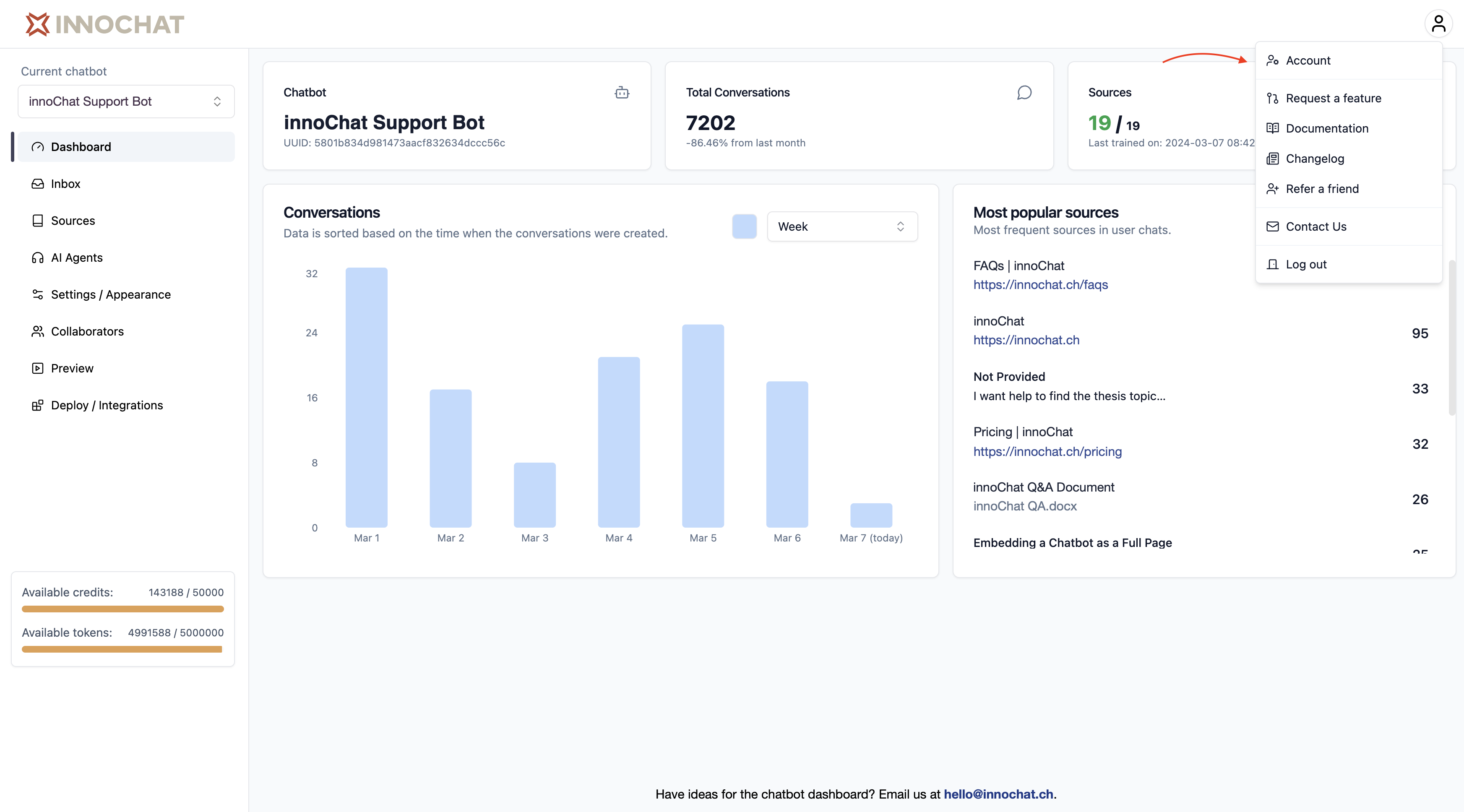
After successfully logging in, you’ll be directed to the app. Look for the “Account” menu in the platform’s
navigation bar. Click on it to access your account settings.
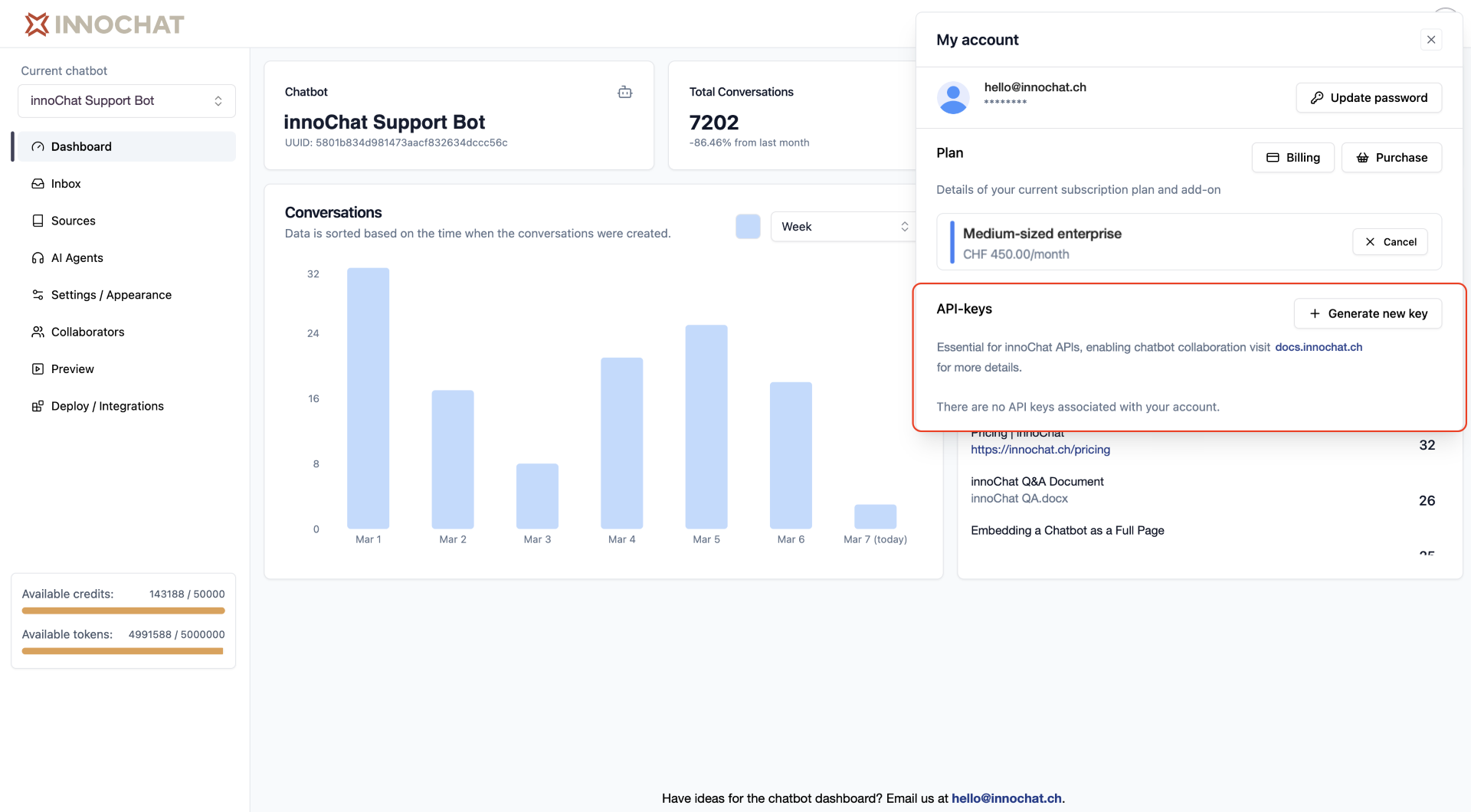
Inside your account settings, you will find an “API Keys” section. Within the API Keys section,
you should see an option to “Generate new key”. Click on it to initiate the process of creating a new API key.
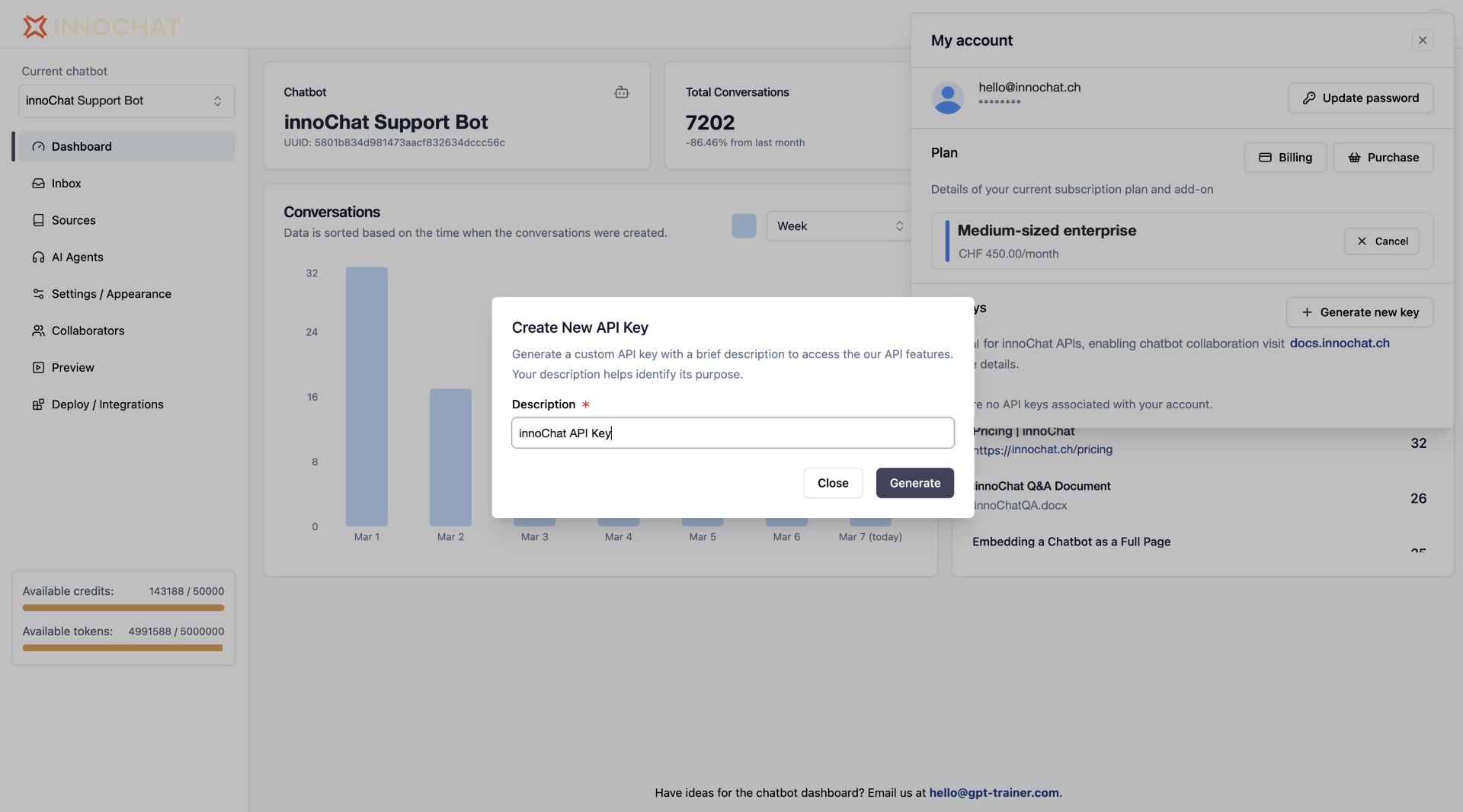
In the “Create New API Key” dialog, provide a description for your API key to help identify its purpose.
Once you’ve entered the description, click the “Generate” button to create your API key.
Be sure to copy and save your API key in a secure location. Do not share it
with anyone, as it provides access to the INNOCHAT API services. Treat your
API key like a password.
Now, you’ve successfully requested, generated, and saved your INNOCHAT API key.
You can use this key to authenticate your requests and integrate INNOCHAT into your applications, scripts, or projects.If you’re ready to dive further and explore practical examples of using the INNOCHAT API, please visit the “Live Examples” section on the left sidebar.
{"docsConfig":{"theme":"mint","$schema":"https://mintlify.com/docs.json","name":"innoChat API","colors":{"primary":"#2E3F51","light":"#516F90","dark":"#0D001D"},"logo":{"light":"https://mintcdn.com/innoq/m-MXq-_ojngkTbq6/logo/light.svg?fit=max\u0026auto=format\u0026n=m-MXq-_ojngkTbq6\u0026q=85\u0026s=40744d3184133a986aba56b47474b33c","dark":"https://mintcdn.com/innoq/m-MXq-_ojngkTbq6/logo/dark.svg?fit=max\u0026auto=format\u0026n=m-MXq-_ojngkTbq6\u0026q=85\u0026s=b9b2ff5ca3f2aba26ea014cc52e30f81"},"favicon":"/logo/favicon.png","api":{},"background":{},"navbar":{"links":[{"href":"mailto:hello@innochat.ch","label":"Support"}],"primary":{"type":"button","label":"Dashboard","href":"https://app.innochat.ch"}},"navigation":{"languages":[{"language":"en","default":true,"href":"introduction"},{"language":"de","href":"de/introduction"},{"language":"fr","href":"fr/introduction"},{"language":"it","href":"it/introduction"}]}},"deployment":{"deploymentMetadataValue":{"subdomain":"innoq","hasAudioNarration":false,"actualSubdomain":"innoq","customDomains":["docs.innochat.ch"],"gitSource":{"type":"github","owner":"innoq-doc","repo":"innoq-doc","deployBranch":"main","contentDirectory":"","isPrivate":true,"mountPath":"","label":""},"chroma":{"liveDeploymentHistoryId":"6a21e708a8fc07c2afd382a3","collectionId":"53bb3d08-7d40-431e-9052-b46127ae217e","schemaVersion":"v2"},"entitlements":{},"buildId":"6a21e708a8fc07c2afd382a3:success","clientVersion":"0.0.3990","searchFilterCounts":[{"language":"en","tag":"API Reference","count":39},{"language":"de","tag":"API-Referenz","count":39},{"language":"fr","tag":"Référence API","count":39},{"language":"it","tag":"Riferimento API","count":36},{"language":"en","tag":"Data Sources","count":22},{"language":"de","tag":"Datenquellen","count":22},{"language":"fr","tag":"Sources de données","count":22},{"language":"it","tag":"Origini dati","count":22},{"language":"en","tag":"Documentation","count":15},{"language":"de","tag":"Dokumentation","count":15},{"language":"fr","tag":"Documentation","count":15},{"language":"it","tag":"Documentazione","count":15},{"language":"en","tag":"Chatbots","count":12},{"language":"en","tag":"Guides","count":12},{"language":"de","tag":"Chatbots","count":12},{"language":"de","tag":"Anleitungen","count":12},{"language":"fr","tag":"Chatbots","count":12},{"language":"fr","tag":"Guides","count":12},{"language":"it","tag":"Chatbot","count":12},{"language":"it","tag":"Guide","count":12},{"language":"en","tag":"Sessions \u0026 Messages","count":11},{"language":"de","tag":"Sitzungen \u0026 Nachrichten","count":11},{"language":"fr","tag":"Sessions \u0026 Messages","count":11},{"language":"en","tag":"Agents","count":10},{"language":"de","tag":"Agenten","count":10},{"language":"fr","tag":"Agents","count":10},{"language":"it","tag":"Agenti","count":10},{"language":"it","tag":"Sessioni e Messaggi","count":8},{"language":"en","tag":"Session Messages","count":6},{"language":"en","tag":"Whitelabel","count":6},{"language":"de","tag":"Sitzungsnachrichten","count":6},{"language":"de","tag":"Whitelabel","count":6},{"language":"fr","tag":"Messages de session","count":6},{"language":"fr","tag":"Marque blanche","count":6},{"language":"it","tag":"Messaggi di sessione","count":6},{"language":"it","tag":"White label","count":6},{"language":"en","tag":"Chatbot Sessions","count":5},{"language":"de","tag":"Chatbot-Sitzungen","count":5},{"language":"fr","tag":"Sessions chatbot","count":5},{"language":"it","tag":"Cookbook","count":5}]},"assistantConfig":{},"basePath":"","hasChatPermissions":false,"hasWebMcpPermissions":false,"toggles":[{"name":"kill-isr","enabled":true,"variant":{"name":"disabled","enabled":false,"feature_enabled":true},"impressionData":false},{"name":"agent-mintlify-slack","enabled":true,"variant":{"name":"disabled","enabled":false,"feature_enabled":true},"impressionData":false},{"name":"editor-v7-file-tree","enabled":true,"variant":{"name":"disabled","enabled":false,"feature_enabled":true},"impressionData":false},{"name":"agent-integrations-settings","enabled":true,"variant":{"name":"disabled","enabled":false,"feature_enabled":true},"impressionData":false},{"name":"automations-pr-grouping","enabled":true,"variant":{"name":"disabled","enabled":false,"feature_enabled":true},"impressionData":false},{"name":"custom-prefix","enabled":true,"variant":{"name":"disabled","enabled":false,"feature_enabled":true},"impressionData":false},{"name":"analytics-v7","enabled":true,"variant":{"name":"disabled","enabled":false,"feature_enabled":true},"impressionData":false},{"name":"user-flows-analytics","enabled":true,"variant":{"name":"disabled","enabled":false,"feature_enabled":true},"impressionData":false},{"name":"no-publish-flow","enabled":true,"variant":{"name":"disabled","enabled":false,"feature_enabled":true},"impressionData":false},{"name":"workos-onboarding","enabled":true,"variant":{"name":"disabled","enabled":false,"feature_enabled":true},"impressionData":false},{"name":"llms-txt-v2","enabled":true,"variant":{"name":"disabled","enabled":false,"feature_enabled":true},"impressionData":false},{"name":"pause-universal-search-reconcile","enabled":true,"variant":{"name":"disabled","enabled":false,"feature_enabled":true},"impressionData":false},{"name":"snapshot-serving-live","enabled":true,"variant":{"name":"disabled","enabled":false,"feature_enabled":true},"impressionData":false},{"name":"stripTemperatureMiddleware","enabled":true,"variant":{"name":"disabled","enabled":false,"feature_enabled":true},"impressionData":false},{"name":"per-site-search-delta","enabled":true,"variant":{"name":"disabled","enabled":false,"feature_enabled":true},"impressionData":false},{"name":"support-platform-pylon-zendesk","enabled":true,"variant":{"name":"disabled","enabled":false,"feature_enabled":true},"impressionData":false},{"name":"snapshot-serving","enabled":true,"variant":{"name":"disabled","enabled":false,"feature_enabled":true},"impressionData":false},{"name":"instant-rollback","enabled":true,"variant":{"name":"disabled","enabled":false,"feature_enabled":true},"impressionData":false},{"name":"granular-notifications-server","enabled":true,"variant":{"name":"disabled","enabled":false,"feature_enabled":true},"impressionData":false},{"name":"granular-notifications","enabled":true,"variant":{"name":"disabled","enabled":false,"feature_enabled":true},"impressionData":false},{"name":"editor-private-page-search","enabled":true,"variant":{"name":"disabled","enabled":false,"feature_enabled":true},"impressionData":false},{"name":"automations-fable","enabled":true,"variant":{"name":"disabled","enabled":false,"feature_enabled":true},"impressionData":false},{"name":"fixed-ai-action-pricing","enabled":true,"variant":{"name":"disabled","enabled":false,"feature_enabled":true},"impressionData":false},{"name":"automation-resolve-merge-conflict","enabled":true,"variant":{"name":"disabled","enabled":false,"feature_enabled":true},"impressionData":false},{"name":"scoped-publishing","enabled":true,"variant":{"name":"disabled","enabled":false,"feature_enabled":true},"impressionData":false},{"name":"mintql","enabled":true,"variant":{"name":"disabled","enabled":false,"feature_enabled":true},"impressionData":false},{"name":"page-level-analytics","enabled":true,"variant":{"name":"disabled","enabled":false,"feature_enabled":true},"impressionData":false},{"name":"editor-version-history-v2","enabled":true,"variant":{"name":"disabled","enabled":false,"feature_enabled":true},"impressionData":false},{"name":"editor-nav-generations","enabled":true,"variant":{"name":"disabled","enabled":false,"feature_enabled":true},"impressionData":false},{"name":"billing-page-v2","enabled":true,"variant":{"name":"disabled","enabled":false,"feature_enabled":true},"impressionData":false},{"name":"workspace-projects","enabled":true,"variant":{"name":"disabled","enabled":false,"feature_enabled":true},"impressionData":false},{"name":"assistant-v5","enabled":true,"variant":{"name":"disabled","enabled":false,"feature_enabled":true},"impressionData":false},{"name":"byok-sep-25","enabled":true,"variant":{"name":"disabled","enabled":false,"feature_enabled":true},"impressionData":false},{"name":"fork-pr-previews","enabled":true,"variant":{"name":"disabled","enabled":false,"feature_enabled":true},"impressionData":false},{"name":"revalidation-jwt","enabled":true,"variant":{"name":"disabled","enabled":false,"feature_enabled":true},"impressionData":false},{"name":"vite-origin","enabled":true,"variant":{"name":"disabled","enabled":false,"feature_enabled":true},"impressionData":false},{"name":"editor-agent-model-picker","enabled":true,"variant":{"name":"disabled","enabled":false,"feature_enabled":true},"impressionData":false},{"name":"billing-updated-9-15","enabled":true,"variant":{"name":"disabled","enabled":false,"feature_enabled":true},"impressionData":false},{"name":"workos-sso-scim","enabled":true,"variant":{"name":"disabled","enabled":false,"feature_enabled":true},"impressionData":false},{"name":"hobby-abuse-scan","enabled":true,"variant":{"name":"disabled","enabled":false,"feature_enabled":true},"impressionData":false},{"name":"dashboard-inbox","enabled":true,"variant":{"name":"disabled","enabled":false,"feature_enabled":true},"impressionData":false},{"name":"workos-signup","enabled":true,"variant":{"name":"disabled","enabled":false,"feature_enabled":true},"impressionData":false},{"name":"workos-enabled","enabled":true,"variant":{"name":"disabled","enabled":false,"feature_enabled":true},"impressionData":false}],"isAtlas":false,"googleFontsInlined":false},"customCss":[],"page":{"pagePath":"api-reference/api-key-setup","slug":"/api-reference/api-key-setup","pageMetadata":{"title":"Getting a INNOCHAT API Key","description":null,"href":"/api-reference/api-key-setup","hidden":false},"pageType":"default","mdx":{"mdxSource":{"compiledSource":"\"use strict\";const{Fragment:_Fragment,jsx:_jsx,jsxs:_jsxs}=arguments[0];const{useMDXComponents:_provideComponents}=arguments[0];function _createMdxContent(props){const _components={a:`a`,p:`p`,strong:`strong`,..._provideComponents(),...props.components},{Frame,Heading,OptimizedImage,Warning}=_components;if(!Frame)_missingMdxReference(`Frame`,true);if(!Heading)_missingMdxReference(`Heading`,true);if(!OptimizedImage)_missingMdxReference(`OptimizedImage`,true);if(!Warning)_missingMdxReference(`Warning`,true);return _jsxs(_Fragment,{children:[_jsx(_components.p,{children:`The following guide walks you through how to obtain an API key. If you already have your API key,\nyou can also explore practical examples and integration tips to jump start your journey with INNOCHAT. Let’s begin!`}),`\n`,_jsx(Heading,{level:`2`,id:`step-1-access-innochat-platform`,children:`Step 1: Access INNOCHAT Platform`}),`\n`,_jsxs(_components.p,{children:[`Go to the `,_jsx(_components.a,{href:`https://app.innochat.ch`,children:`INNOCHAT platform`}),`.`]}),`\n`,_jsx(Heading,{level:`2`,id:`step-2-create-an-account-if-you-don’t-already-have-one`,children:`Step 2: Create an Account (If you don’t already have one)`}),`\n`,_jsx(_components.p,{children:`If you don’t have an account on the INNOCHAT platform, click on the “Sign Up” or “Create Account”\nbutton and follow the registration process. Provide the required information to create your account.`}),`\n`,_jsx(Heading,{level:`2`,id:`step-3-access-your-account-menu`,children:`Step 3: Access Your Account Menu`}),`\n`,_jsx(_components.p,{children:`After successfully logging in, you’ll be directed to the app. Look for the “Account” menu in the platform’s\nnavigation bar. Click on it to access your account settings.`}),`\n`,_jsx(Frame,{children:_jsx(OptimizedImage,{src:`https://mintcdn.com/innoq/-rzRPawWGCb-PHDN/images/api-key-1.png?fit=max\u0026auto=format\u0026n=-rzRPawWGCb-PHDN\u0026q=85\u0026s=0779e127fda23a6818f49d79ff4c66cf`,\"data-og-width\":`3490`,width:`3490`,\"data-og-height\":`1936`,height:`1936`,\"data-path\":`images/api-key-1.png`,\"data-optimize\":`true`,\"data-opv\":`3`,srcset:`https://mintcdn.com/innoq/-rzRPawWGCb-PHDN/images/api-key-1.png?w=280\u0026fit=max\u0026auto=format\u0026n=-rzRPawWGCb-PHDN\u0026q=85\u0026s=131352f7beed4b94efce95e597c0969e 280w, https://mintcdn.com/innoq/-rzRPawWGCb-PHDN/images/api-key-1.png?w=560\u0026fit=max\u0026auto=format\u0026n=-rzRPawWGCb-PHDN\u0026q=85\u0026s=94382a0bf60c1516fd2ba40124a47370 560w, https://mintcdn.com/innoq/-rzRPawWGCb-PHDN/images/api-key-1.png?w=840\u0026fit=max\u0026auto=format\u0026n=-rzRPawWGCb-PHDN\u0026q=85\u0026s=650e5dbacd2fb1f2942f149fce33ed1a 840w, https://mintcdn.com/innoq/-rzRPawWGCb-PHDN/images/api-key-1.png?w=1100\u0026fit=max\u0026auto=format\u0026n=-rzRPawWGCb-PHDN\u0026q=85\u0026s=f06da046452704baeb33e5ed78dd946d 1100w, https://mintcdn.com/innoq/-rzRPawWGCb-PHDN/images/api-key-1.png?w=1650\u0026fit=max\u0026auto=format\u0026n=-rzRPawWGCb-PHDN\u0026q=85\u0026s=87190052dce2e3a1ce32d3f8326b5bb6 1650w, https://mintcdn.com/innoq/-rzRPawWGCb-PHDN/images/api-key-1.png?w=2500\u0026fit=max\u0026auto=format\u0026n=-rzRPawWGCb-PHDN\u0026q=85\u0026s=2ea58a6dd09c540f5c7e8079d8a5d2ff 2500w`})}),`\n`,_jsx(Heading,{level:`2`,id:`step-4-navigate-to-api-keys-section`,children:`Step 4: Navigate to API Keys Section`}),`\n`,_jsx(_components.p,{children:`Inside your account settings, you will find an “API Keys” section. Within the API Keys section,\nyou should see an option to “Generate new key”. Click on it to initiate the process of creating a new API key.`}),`\n`,_jsx(Frame,{children:_jsx(OptimizedImage,{src:`https://mintcdn.com/innoq/-rzRPawWGCb-PHDN/images/api-key-2.png?fit=max\u0026auto=format\u0026n=-rzRPawWGCb-PHDN\u0026q=85\u0026s=20d545a73b6c5bf0273f984a6c72f719`,\"data-og-width\":`1920`,width:`1920`,\"data-og-height\":`1060`,height:`1060`,\"data-path\":`images/api-key-2.png`,\"data-optimize\":`true`,\"data-opv\":`3`,srcset:`https://mintcdn.com/innoq/-rzRPawWGCb-PHDN/images/api-key-2.png?w=280\u0026fit=max\u0026auto=format\u0026n=-rzRPawWGCb-PHDN\u0026q=85\u0026s=712fe9d156e372a9339b47cbe5c856c3 280w, https://mintcdn.com/innoq/-rzRPawWGCb-PHDN/images/api-key-2.png?w=560\u0026fit=max\u0026auto=format\u0026n=-rzRPawWGCb-PHDN\u0026q=85\u0026s=d5496b57c069e58fa12ea4674ef0e73d 560w, https://mintcdn.com/innoq/-rzRPawWGCb-PHDN/images/api-key-2.png?w=840\u0026fit=max\u0026auto=format\u0026n=-rzRPawWGCb-PHDN\u0026q=85\u0026s=5da6f69ad0647b9b7394f6f8e887a803 840w, https://mintcdn.com/innoq/-rzRPawWGCb-PHDN/images/api-key-2.png?w=1100\u0026fit=max\u0026auto=format\u0026n=-rzRPawWGCb-PHDN\u0026q=85\u0026s=f8affd96db4d75ecacd730e3241c9ba0 1100w, https://mintcdn.com/innoq/-rzRPawWGCb-PHDN/images/api-key-2.png?w=1650\u0026fit=max\u0026auto=format\u0026n=-rzRPawWGCb-PHDN\u0026q=85\u0026s=61236efd4f15e3c9eb01a9ec78c703c2 1650w, https://mintcdn.com/innoq/-rzRPawWGCb-PHDN/images/api-key-2.png?w=2500\u0026fit=max\u0026auto=format\u0026n=-rzRPawWGCb-PHDN\u0026q=85\u0026s=10c3f7939ca935f1f3bce12b79a51602 2500w`})}),`\n`,_jsx(Heading,{level:`2`,id:`step-5-enter-key-description-and-generate`,children:`Step 5: Enter Key Description and Generate`}),`\n`,_jsx(_components.p,{children:`In the “Create New API Key” dialog, provide a description for your API key to help identify its purpose.\nOnce you’ve entered the description, click the “Generate” button to create your API key.`}),`\n`,_jsx(Warning,{children:_jsx(_components.p,{children:`Be sure to copy and save your API key in a secure location. Do not share it\nwith anyone, as it provides access to the INNOCHAT API services. Treat your\nAPI key like a password.`})}),`\n`,_jsx(Frame,{children:_jsx(OptimizedImage,{src:`https://mintcdn.com/innoq/-rzRPawWGCb-PHDN/images/api-key-3.png?fit=max\u0026auto=format\u0026n=-rzRPawWGCb-PHDN\u0026q=85\u0026s=fb504a587f6a91c100e78ed714a67855`,\"data-og-width\":`1920`,width:`1920`,\"data-og-height\":`1066`,height:`1066`,\"data-path\":`images/api-key-3.png`,\"data-optimize\":`true`,\"data-opv\":`3`,srcset:`https://mintcdn.com/innoq/-rzRPawWGCb-PHDN/images/api-key-3.png?w=280\u0026fit=max\u0026auto=format\u0026n=-rzRPawWGCb-PHDN\u0026q=85\u0026s=e15824106ca2f736ec58085745830b83 280w, https://mintcdn.com/innoq/-rzRPawWGCb-PHDN/images/api-key-3.png?w=560\u0026fit=max\u0026auto=format\u0026n=-rzRPawWGCb-PHDN\u0026q=85\u0026s=92fb51e96e3a0316afaefca388ed8318 560w, https://mintcdn.com/innoq/-rzRPawWGCb-PHDN/images/api-key-3.png?w=840\u0026fit=max\u0026auto=format\u0026n=-rzRPawWGCb-PHDN\u0026q=85\u0026s=a47d016f4eb8ae5221f8666e630ad807 840w, https://mintcdn.com/innoq/-rzRPawWGCb-PHDN/images/api-key-3.png?w=1100\u0026fit=max\u0026auto=format\u0026n=-rzRPawWGCb-PHDN\u0026q=85\u0026s=0dbf7e59cf907e6ff55db5ac0b6e15cb 1100w, https://mintcdn.com/innoq/-rzRPawWGCb-PHDN/images/api-key-3.png?w=1650\u0026fit=max\u0026auto=format\u0026n=-rzRPawWGCb-PHDN\u0026q=85\u0026s=38889355cb06cd926b7794ee1760fee4 1650w, https://mintcdn.com/innoq/-rzRPawWGCb-PHDN/images/api-key-3.png?w=2500\u0026fit=max\u0026auto=format\u0026n=-rzRPawWGCb-PHDN\u0026q=85\u0026s=e1e6f554ba40eaaa1cf205edb0a3c8b3 2500w`})}),`\n`,_jsx(_components.p,{children:`Now, you’ve successfully requested, generated, and saved your INNOCHAT API key.\nYou can use this key to authenticate your requests and integrate INNOCHAT into your applications, scripts, or projects.`}),`\n`,_jsxs(_components.p,{children:[`If you’re ready to dive further and explore practical examples of using the INNOCHAT API, please visit the `,_jsx(_components.strong,{children:`“Live Examples”`}),` section on the left sidebar.`]})]})}function MDXContent(props={}){const{wrapper:MDXLayout}={..._provideComponents(),...props.components};return MDXLayout?_jsx(MDXLayout,{...props,children:_jsx(_createMdxContent,{...props})}):_createMdxContent(props)}return{default:MDXContent};function _missingMdxReference(id,component){throw new Error(`Expected `+(component?`component`:`object`)+\" `\"+id+\"` to be defined: you likely forgot to import, pass, or provide it.\")}","frontmatter":{},"scope":{"config":{},"pageMetadata":{"title":"Getting a INNOCHAT API Key","description":null,"href":"/api-reference/api-key-setup","hidden":false}}},"mdxSourceWithNoJs":null},"mdxExtracts":{"tableOfContents":[{"title":"Step 1: Access INNOCHAT Platform","slug":"step-1-access-innochat-platform","depth":2,"children":[]},{"title":"Step 2: Create an Account (If you don’t already have one)","slug":"step-2-create-an-account-if-you-don’t-already-have-one","depth":2,"children":[]},{"title":"Step 3: Access Your Account Menu","slug":"step-3-access-your-account-menu","depth":2,"children":[]},{"title":"Step 4: Navigate to API Keys Section","slug":"step-4-navigate-to-api-keys-section","depth":2,"children":[]},{"title":"Step 5: Enter Key Description and Generate","slug":"step-5-enter-key-description-and-generate","depth":2,"children":[]}],"codeExamples":{}},"jsLinks":[],"subdomain":"innoq","siteName":"innoChat API","title":"Getting a INNOCHAT API Key - innoChat API","navMaps":{"firstHrefInVersion":{},"firstHrefInLanguage":{"en":{"href":"/api-reference/api-key-setup","matchLevel":0},"de":{"href":"/de/api-reference/api-key-setup","matchLevel":1},"fr":{"href":"/fr/api-reference/api-key-setup","matchLevel":1},"it":{"href":"/it/api-reference/api-key-setup","matchLevel":1}}},"lastModified":"2025-10-15T19:20:36.907Z","originalFileLocation":"api-reference/api-key-setup.mdx","locale":"en"},"headHtml":"\u003cscript data-mint-head>(function(){var d=document.documentElement,p=null;if(!p){try{p=localStorage.getItem(\"isDarkMode\")}catch(e){}if(p==='true')p='dark';else if(p==='false')p='light';if(p!=='light'\u0026\u0026p!=='dark'\u0026\u0026p!=='system')p=\"system\"}var r=p==='system'?(matchMedia(\"(prefers-color-scheme: dark)\").matches?'dark':'light'):p;d.classList.remove(r==='dark'?'light':'dark');d.classList.add(r);d.setAttribute(\"data-theme-preference\",p)})();\u003c/script>\u003cmeta data-mint-head name=\"application-name\" content=\"innoChat API\">\u003cmeta data-mint-head name=\"generator\" content=\"Mintlify\">\u003clink data-mint-head rel=\"icon\" type=\"image/png\" sizes=\"192x192\" href=\"/mintlify-assets/_mintlify/favicons/innoq/xIqE2ijYpQ8yansi/_generated/favicon/android-chrome-192x192.png\" media=\"(prefers-color-scheme: light)\">\u003clink data-mint-head rel=\"apple-touch-icon\" type=\"image/png\" sizes=\"180x180\" href=\"/mintlify-assets/_mintlify/favicons/innoq/xIqE2ijYpQ8yansi/_generated/favicon/apple-touch-icon.png\">\u003clink data-mint-head rel=\"icon\" type=\"image/png\" sizes=\"16x16\" href=\"/mintlify-assets/_mintlify/favicons/innoq/xIqE2ijYpQ8yansi/_generated/favicon/favicon-16x16.png\" media=\"(prefers-color-scheme: light)\">\u003clink data-mint-head rel=\"icon\" type=\"image/png\" sizes=\"32x32\" href=\"/mintlify-assets/_mintlify/favicons/innoq/xIqE2ijYpQ8yansi/_generated/favicon/favicon-32x32.png\" media=\"(prefers-color-scheme: light)\">\u003clink data-mint-head rel=\"shortcut icon\" type=\"image/x-icon\" href=\"/mintlify-assets/_mintlify/favicons/innoq/xIqE2ijYpQ8yansi/_generated/favicon/favicon.ico\" media=\"(prefers-color-scheme: light)\">\u003clink data-mint-head rel=\"icon\" type=\"image/png\" sizes=\"192x192\" href=\"/mintlify-assets/_mintlify/favicons/innoq/xIqE2ijYpQ8yansi/_generated/favicon-dark/android-chrome-192x192.png\" media=\"(prefers-color-scheme: dark)\">\u003clink data-mint-head rel=\"icon\" type=\"image/png\" sizes=\"16x16\" href=\"/mintlify-assets/_mintlify/favicons/innoq/xIqE2ijYpQ8yansi/_generated/favicon-dark/favicon-16x16.png\" media=\"(prefers-color-scheme: dark)\">\u003clink data-mint-head rel=\"icon\" type=\"image/png\" sizes=\"32x32\" href=\"/mintlify-assets/_mintlify/favicons/innoq/xIqE2ijYpQ8yansi/_generated/favicon-dark/favicon-32x32.png\" media=\"(prefers-color-scheme: dark)\">\u003clink data-mint-head rel=\"shortcut icon\" type=\"image/x-icon\" href=\"/mintlify-assets/_mintlify/favicons/innoq/xIqE2ijYpQ8yansi/_generated/favicon-dark/favicon.ico\" media=\"(prefers-color-scheme: dark)\">\u003cmeta data-mint-head property=\"og:title\" content=\"Getting a INNOCHAT API Key - innoChat API\">\u003cmeta data-mint-head property=\"og:site_name\" content=\"innoChat API\">\u003cmeta data-mint-head property=\"og:url\" content=\"https://docs.innochat.ch/api-reference/api-key-setup\">\u003cmeta data-mint-head property=\"og:type\" content=\"website\">\u003cmeta data-mint-head property=\"og:image\" content=\"https://innoq.mintlify.app/_mintlify/api/og/v2?division=Documentation\u0026amp;title=Getting+a+INNOCHAT+API+Key\u0026amp;theme=d32e8e178367d8e52a00ee73\u0026amp;signature=8812c072d6ab0db57e353a335fc980ec57bb180889533c881747ba0598f5cbe3\">\u003cmeta data-mint-head property=\"og:image:width\" content=\"1200\">\u003cmeta data-mint-head property=\"og:image:height\" content=\"630\">\u003cmeta data-mint-head name=\"twitter:card\" content=\"summary_large_image\">\u003cmeta data-mint-head name=\"twitter:title\" content=\"Getting a INNOCHAT API Key - innoChat API\">\u003cmeta data-mint-head name=\"twitter:image\" content=\"https://innoq.mintlify.app/_mintlify/api/og/v2?division=Documentation\u0026amp;title=Getting+a+INNOCHAT+API+Key\u0026amp;theme=d32e8e178367d8e52a00ee73\u0026amp;signature=8812c072d6ab0db57e353a335fc980ec57bb180889533c881747ba0598f5cbe3\">\u003cmeta data-mint-head name=\"twitter:image:width\" content=\"1200\">\u003cmeta data-mint-head name=\"twitter:image:height\" content=\"630\">\u003cmeta data-mint-head name=\"msapplication-config\" content=\"/mintlify-assets/_mintlify/favicons/innoq/xIqE2ijYpQ8yansi/_generated/favicon/browserconfig.xml\">\u003cmeta data-mint-head name=\"apple-mobile-web-app-title\" content=\"innoChat API\">\u003cmeta data-mint-head name=\"msapplication-TileColor\" content=\"#2E3F51\">\u003clink data-mint-head rel=\"canonical\" href=\"https://docs.innochat.ch/api-reference/api-key-setup\">\u003clink data-mint-head rel=\"alternate\" type=\"application/xml\" href=\"/sitemap.xml\">\u003clink data-mint-head rel=\"alternate\" type=\"text/markdown\" href=\"/api-reference/api-key-setup.md\">\u003clink data-mint-head rel=\"alternate\" hreflang=\"en\" href=\"https://docs.innochat.ch/api-reference/api-key-setup\">\u003clink data-mint-head rel=\"alternate\" hreflang=\"de\" href=\"https://docs.innochat.ch/de/api-reference/api-key-setup\">\u003clink data-mint-head rel=\"alternate\" hreflang=\"fr\" href=\"https://docs.innochat.ch/fr/api-reference/api-key-setup\">\u003clink data-mint-head rel=\"alternate\" hreflang=\"it\" href=\"https://docs.innochat.ch/it/api-reference/api-key-setup\">\u003clink data-mint-head rel=\"alternate\" hreflang=\"x-default\" href=\"https://docs.innochat.ch/api-reference/api-key-setup\">\u003cscript data-mint-head type=\"application/ld+json\">{\"@context\":\"https://schema.org\",\"@graph\":[{\"@type\":\"Organization\",\"@id\":\"https://docs.innochat.ch/#organization\",\"name\":\"innoChat API\",\"url\":\"https://docs.innochat.ch\",\"logo\":{\"@type\":\"ImageObject\",\"url\":\"https://mintcdn.com/innoq/m-MXq-_ojngkTbq6/logo/light.svg?fit=max\u0026auto=format\u0026n=m-MXq-_ojngkTbq6\u0026q=85\u0026s=40744d3184133a986aba56b47474b33c\"}},{\"@type\":\"WebSite\",\"@id\":\"https://docs.innochat.ch#website\",\"name\":\"innoChat API\",\"url\":\"https://docs.innochat.ch\",\"publisher\":{\"@id\":\"https://docs.innochat.ch/#organization\"}},{\"@type\":\"WebPage\",\"@id\":\"https://docs.innochat.ch/api-reference/api-key-setup#webpage\",\"url\":\"https://docs.innochat.ch/api-reference/api-key-setup\",\"name\":\"Getting a INNOCHAT API Key\",\"dateModified\":\"2025-10-15T19:20:36.907Z\",\"isPartOf\":{\"@id\":\"https://docs.innochat.ch#website\"}},{\"@type\":[\"Article\",\"TechArticle\"],\"@id\":\"https://docs.innochat.ch/api-reference/api-key-setup#article\",\"headline\":\"Getting a INNOCHAT API Key\",\"name\":\"Getting a INNOCHAT API Key\",\"url\":\"https://docs.innochat.ch/api-reference/api-key-setup\",\"mainEntityOfPage\":{\"@id\":\"https://docs.innochat.ch/api-reference/api-key-setup#webpage\"},\"dateModified\":\"2025-10-15T19:20:36.907Z\",\"publisher\":{\"@id\":\"https://docs.innochat.ch/#organization\"},\"isPartOf\":{\"@id\":\"https://docs.innochat.ch#website\"}}]}\u003c/script>\u003cscript data-mint-head type=\"application/ld+json\">{\"@context\":\"https://schema.org\",\"@type\":\"WebSite\",\"name\":\"innoChat API\",\"creator\":{\"@type\":\"Organization\",\"name\":\"Mintlify\",\"url\":\"https://mintlify.com\"}}\u003c/script>","siteName":"innoChat API","nav":{"global":null,"languages":[{"language":"en","default":true,"tabs":[{"tab":"Documentation","pages":[{"title":"Documentation","href":"/introduction"}]},{"tab":"API Reference","anchors":[{"anchor":"API Usage Guides","icon":"book","pages":[{"title":"Getting a INNOCHAT API Key","href":"/api-reference/api-key-setup"},{"title":"Create Chatbot","description":null,"href":"/api-reference/guide-00-chatbot-create"},{"title":"Chat with Chatbot","href":"/api-reference/guide-01-chat"},{"title":"Uploading Data Sources","href":"/api-reference/guide-02-source"}]},{"anchor":"Chatbots","icon":"comments","pages":[{"title":"Chatbots","href":"/api-reference/chatbots/properties-reference"}]},{"anchor":"Agents","icon":"robot","pages":[{"title":"Agents","href":"/api-reference/agents/properties-reference"}]},{"anchor":"Sessions \u0026 Messages","icon":"message","pages":[{"title":"Sessions \u0026 Messages","href":"/api-reference/sessions/properties-reference"}]},{"anchor":"Data Sources","icon":"database","pages":[{"title":"Data Sources","href":"/api-reference/data-sources/properties-reference"}]}]},{"tab":"Cookbook","pages":[{"title":"Cookbook","href":"/cookbook/overview"}]},{"tab":"Integrations","pages":[{"title":"Integrations","href":"/integrations/slack"}]},{"tab":"Tools","pages":[{"title":"Tools","href":"/tools/tools-intro"}]},{"tab":"Whitelabel","pages":[{"title":"Whitelabel","href":"/whitelabel/whitelabel-intro"}]}]},{"language":"de","pages":[{"title":"de","href":"/de/api-reference/api-key-setup"}]},{"language":"fr","pages":[{"title":"fr","href":"/fr/api-reference/api-key-setup"}]},{"language":"it","pages":[{"title":"it","href":"/it/api-reference/api-key-setup"}]}]},"title":"Getting a INNOCHAT API Key - innoChat API","buildId":"dpl_2oYXwqkEXirXBPk8wV1FtM5USFWi","deploymentId":"dpl_2oYXwqkEXirXBPk8wV1FtM5USFWi","dynamics":["07c022d89b","a74be98ba7"],"chunks":["Frame-BbYRHtLl.js","DynamicMarkdown-DN96a4Ur.js","zoom-image-lightbox-D7yRe3On.js","lightbox-handle-r17bVUz3.js"]}